What is earphone jack: Easy Guide
You've plugged in a pair of earphones, and only one side plays. Or maybe your laptop doesn't recognize the headset mic at all. You're staring at a tiny metal cylinder and wondering what is earphone jack, really, and why some work in some ports and not others.
That little connector has been the standard for personal audio since the 1960s, but the world of 3.5mm jacks, TRRS pinouts, and OMTP vs CTIA wiring is messier than it looks. Aggregate user reports in 2026 still show the 3.5mm jack as the most recognized audio connector on the planet, while USB-C and Bluetooth keep nibbling at its share. Here's what you actually need to know.
Quick Answer
An earphone jack is a small cylindrical audio connector, most often 3.5mm wide.
It carries analog audio signals from a source device to headphones or a headset.
Variants with extra metal rings also pass microphone and control signals.
The standard is defined by IEC 60603-11, which governs its physical and electrical specs.
Why Visuals Matter When Learning About the Earphone Jack
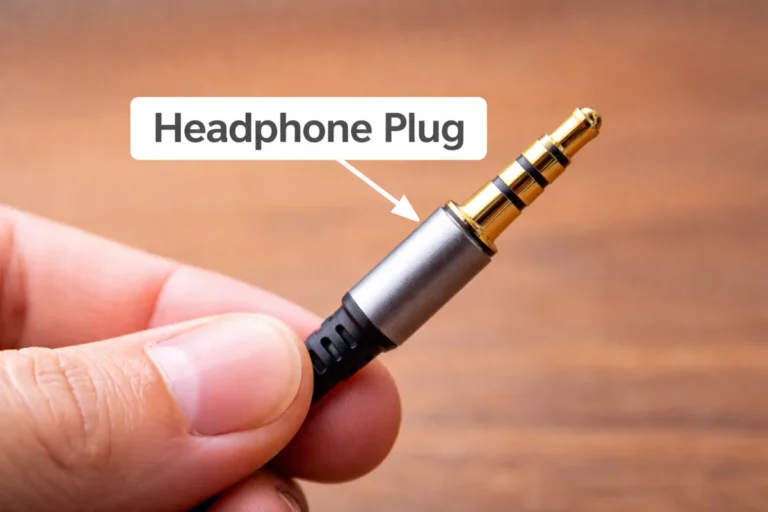
You can read the word "jack" a hundred times, but the concept clicks the moment you see the metal sleeve, the black rings, and the plastic tip stacked end to end.
What a photo or close-up actually reveals:
- The exact diameter (3.5mm vs 6.35mm vs 2.5mm)
- The number of black insulator rings separating the metal contacts
- How deep the plug seats into the female port on your phone or laptop
- Whether the port is flush, recessed, or combined with a mic hole
A diagram makes this even clearer. You can see which metal band carries left audio, which carries right audio, and where the microphone signal lives. That's the difference between understanding the connector and just guessing.
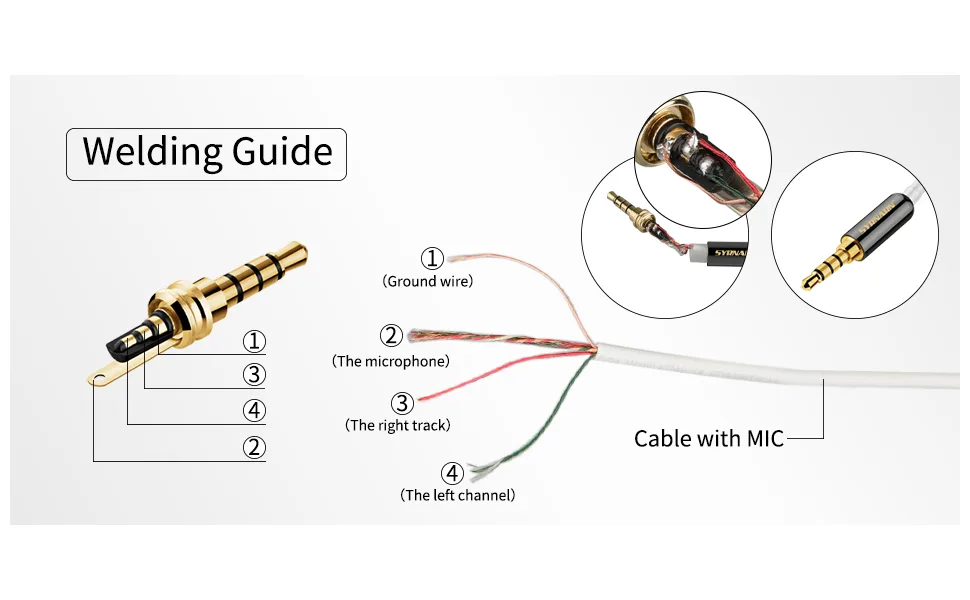
What an Earphone Jack Actually Is
At its core, an earphone jack is a barrel-shaped analog audio interface with a male plug on the cable and a female port on the device. The male side is the metal cylinder you hold. The female side is the matching hole on the phone, laptop, or stereo.
When the two mate, electrical contacts touch and audio flows.
A few key specs anchor the standard:
| Feature | Typical Value |
|---|---|
| Standard diameter | 3.5mm (1/8 inch) |
| Pro audio diameter | 6.35mm (1/4 inch) |
| Legacy/rare diameter | 2.5mm |
| Governing standard | IEC 60603-11 |
| Nominal impedance | 16 to 32 ohms for earphones |
Manufacturer specs from Sennheiser, Sony, and Bose all reference these diameters when listing compatible cables. If you've ever lost an adapter on a flight and grabbed a cheap spare from the airport kiosk, you've already seen how standardized this connector really is.
The Anatomy of an Earphone Jack: Tip, Ring, Sleeve Explained
Strip away the plastic and you find a stack of tiny conductors. Each black ring is an insulator separating one metal contact from the next. The number of rings tells you what kind of jack you're dealing with.
Here's how the stack reads, from the tip inward:
- Tip: first conductor, usually the left audio channel
- Ring: second conductor (TRS/TRRS only), usually the right audio channel or mic
- Ring 2: third conductor (TRRS only), often the ground or mic depending on standard
- Sleeve: last conductor, typically the common ground
A TS plug has Tip + Sleeve (no rings). A TRS plug adds one ring. A TRRS plug adds two rings and four total conductors.
Three practical takeaways:
- Count the black bands. Two bands = TRS stereo. Three bands = TRRS with mic support.
- Look at the length of the tip. A longer tip section usually means a CTIA-style TRRS plug.
- Hold it under light. You can often spot the difference between gold-plated and nickel contacts.
Most consumer headphones since 2010 ship as TRRS because phones need mic input plus playback on a single jack. If you travel with a backup lightweight charger and a pair of wired earbuds, you're already carrying a TRRS plug without thinking about it.
The Three Main Sizes: 2.5mm, 3.5mm, and 6.35mm
You'd think one size would have won, but three still survive in 2026. Each has its own niche.
2.5mm: The Quiet Survivor
This micro-jack shows up on older two-way radios, some aviation headsets, and a handful of camera mic inputs. It used to be common on flip phones before the 3.5mm took over. If you own modern consumer gear, you probably never see one.
3.5mm: The Default
This is the size on iPhones, Android phones, laptops, portable game systems, and car AUX ports. IEC 60603-11 governs its dimensions, and it accepts both TRS and TRRS plugs. Walk into any electronics store and you'll find a wall of 3.5mm cables.
6.35mm: The Pro Standard
Also called a quarter-inch jack, this is the connector of choice for electric guitars, studio headphones, and DJ mixers. You'll find adapters that step it down to 3.5mm for casual listening, and they cost about as much as a coffee.
| Diameter | Common Use | Typical Device |
|---|---|---|
| 2.5mm | Two-way radios, aviation | Legacy radios |
| 3.5mm | Phones, laptops, tablets | Consumer audio |
| 6.35mm | Studio gear, guitars | Pro audio equipment |
If your daily driver is a smartphone, you care almost entirely about the 3.5mm size. The other two matter when you step into hobby or pro territory, like recording with a dedicated mic or plugging into a stage amp.
By the way, if your phone dropped its headphone port entirely and you're leaning on a portable power source to keep a USB-C audio adapter alive on long trips, you're not alone. That's the new normal for a lot of listeners in 2026.
TRS vs TRRS vs TS: How the Contact Rings Change Everything
The number of black insulator rings on the plug is the single biggest clue to what it does. Here's a quick rundown before the diagram:
- TS (Tip + Sleeve, no rings): mono audio only. Used on old guitar cables and some simple microphones.
- TRS (Tip + Ring + Sleeve, one ring): stereo audio. The right channel rides on the ring, the left on the tip.
- TRRS (Tip + Ring + Ring + Sleeve, two rings): stereo plus microphone or remote control signals.
Why TRRS Took Over
Once phones became music players, hardware designers needed mic input, play, and pause on the same cable. That required a fourth conductor, and TRRS became the answer. Per Apple's developer documentation on Lightning and USB-C audio adapters, modern headsets route microphone signals through that extra ring.
Real-World Confusion
Plug a TRRS plug into a TRS-only port and you usually lose the mic. The extra ring has nowhere to land. Plug a TRS plug into a TRRS port and most devices fall back to stereo audio, with the mic disabled.
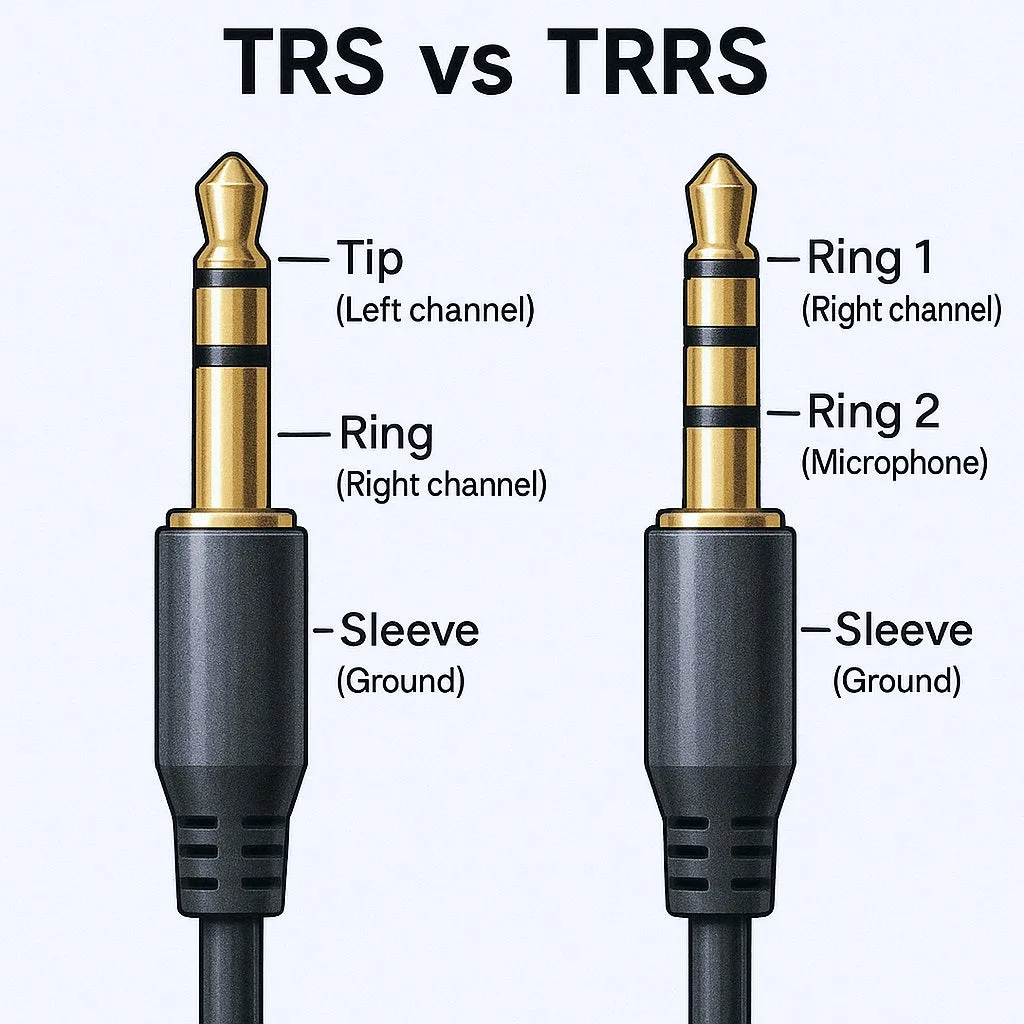
The labeled diagram makes the contact layout obvious. Once you see which band is which, the labels stop being abstract and start making mechanical sense.
| Plug Type | Rings | Conductors | Best For |
|---|---|---|---|
| TS | 0 | 2 | Mono instruments |
| TRS | 1 | 3 | Stereo headphones |
| TRRS | 2 | 4 | Headsets with mic |
If you're packing a travel-ready power bank and a headset for a long flight, double-check the cable. A TRRS cable is what you want for in-line mic calls during turbulence.
OMTP vs CTIA: Why Your Mic Sometimes Doesn't Work
The two TRRS wiring standards, OMTP and CTIA, decide which conductor carries the microphone and which carries the ground. Apple popularized one, most Android makers standardized on the other, and the result is two decades of headset confusion.
OMTP (Open Mobile Terminal Platform) was the early European standard. It placed the microphone on the sleeve and ground on the second ring. CTIA (Cellular Telecommunications Industry Association) flipped that.
Ground moved to the sleeve, and the microphone moved to the second ring.
What Happens When Standards Mix
Plug an OMTP headset into a CTIA phone. Your music plays, the mic doesn't register, and you sound like a robot on calls. CTIA into OMTP shows the same problem in reverse.
The fix is almost always a small TRRS adapter that swaps ground and mic between the two standards. They cost a couple of bucks and they end the headache.
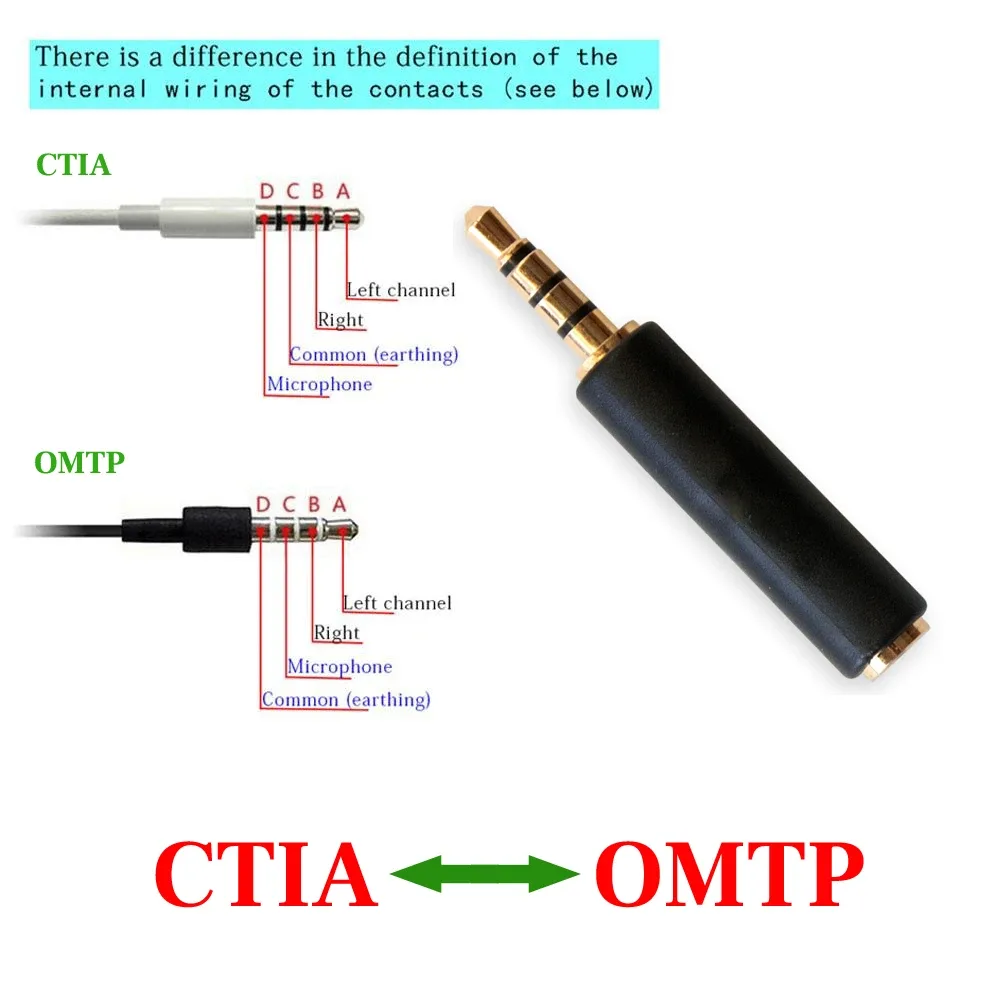
A side-by-side pinout diagram is honestly the fastest way to internalize the difference. Once you see ground and mic trade places, the whole CTIA vs OMTP confusion collapses into a one-line memory trick.
| Standard | Microphone Pin | Ground Pin | Common In |
|---|---|---|---|
| OMTP | Sleeve | Ring 2 | Older Nokia, early Sony Ericsson |
| CTIA | Ring 2 | Sleeve | iPhones, most modern Android |
If you're carrying a backup portable charger for a trip and want a headset that works on whatever device you borrow, a CTIA-labeled cable is the safer default in 2026.
How to Visually Identify the Jack on Your Device
Before you troubleshoot anything, you need to know what you're looking at. Most ports look similar at a glance, but a few visual cues separate them.
The Headphone Symbol
Look for the tiny headphone icon printed or laser-etched next to the port. It's usually right above or beside the hole. On older laptops, it might be a green ring around the female port, following the PC audio color code.
Ring Color
Many motherboards and laptops follow the Intel desktop board front-panel audio standard. Green means line-out (headphones). Pink means mic-in.
Black often means line-in.
Port Shape
A 3.5mm female port is a perfect circle. A 6.35mm port is a wider circle that won't accept a 3.5mm plug. A 2.5mm port is the same circle, just smaller.
If your plug drops in loosely, the diameters probably don't match.
Quick visual checklist:
- Headphone icon? Yes = audio out.
- Green ring? Yes = audio out on PC.
- Pink ring? Yes = mic input.
- Plug drops in too easily? Wrong diameter.
- Plug won't go in at all? Wrong orientation or wrong size.
Where You'll Find an Earphone Jack
The 3.5mm jack shows up in more places than most people realize, and 2026 has not killed it yet.
Phones and tablets used to be universal, but flagship phones have dropped the port. Budget and mid-range Android phones still ship with one. Apple's iPad line keeps it on most variants.
Samsung's Galaxy Tab includes it too.
Laptops almost all include a combo audio jack that accepts TRRS headsets. That single hole covers headphone out, mic in, and headset use.
Pro audio lives on the 6.35mm jack. Studio monitors, mixers, and electric guitars stick with the quarter-inch connector because it's mechanically tougher and pairs well with balanced signals.
Cars use the AUX port, which is a 3.5mm line-in that plays whatever your phone pushes through it. Many newer cars have dropped AUX in favor of Bluetooth, but the jack survives in older models.
Where It's Fading
In 2026 the 3.5mm jack is most threatened on flagship phones. Aggregate review data from major outlets shows that budget phones still ship with it as a selling point, while premium models lean on USB-C audio and wireless earbuds.
Why Smartphone Makers Started Removing the 3.5mm Jack
Apple kicked off the trend in 2016 with the iPhone 7, citing three reasons. Saving internal space for bigger batteries, pushing wireless audio forward, and improving water resistance all made the engineering case.
Android makers followed within a year. Samsung held out longest among the flagships but eventually caved. The result is a fragmented market where your phone might, or might not, have the port.
Real benefits to dropping it
- More room for a larger battery or haptics motor
- A cleaner internal layout for better water sealing
- Push toward digital audio paths through USB-C or Lightning
Real drawbacks
- Dongle life: you carry an adapter everywhere
- You can't charge and listen at once without a splitter
- Latency and quality vary wildly on cheap USB-C adapters
For travelers packing a single fast-charge power bank and a Lightning-to-3.5mm adapter, the math gets old fast. Lose the adapter and your wired earbuds become e-waste until you find a replacement.
Common Earphone Jack Problems and What They Look Like
When a 3.5mm jack fails, it usually fails in a recognizable way. Aggregate user reports in 2026 still list the same handful of symptoms year after year.
Static and Crackling
Most often this is oxidation on the contacts. Pocket lint and sweat build up inside the female port and create a poor connection. A quick clean fixes it more often than not.
One Earbud Silent
Either the cable has an internal break, or the plug is TRRS and the device is reading it as TRS. Try another device first. If the same earbud drops out, the cable is the culprit.
Mic Not Recognized
Almost always an OMTP vs CTIA mismatch. The mic signal lands on the wrong conductor. A small polarity-swap adapter resolves it.
Intermittent Audio When You Move the Plug
The plug or the port is worn. Mechanical lifespan for a typical 3.5mm jack runs about 5,000 insertion cycles. After that, the contacts loosen and signal drops when you wiggle the cable.
How to Clean and Maintain a 3.5mm Jack Safely
A dirty jack is the number one cause of audio issues, and the fix takes about two minutes. The goal is to clear debris without damaging the contacts.
Step-by-step:
- Power the device off before you start.
- Use a wooden or plastic toothpick to gently scrape the inside walls of the port.
- Follow up with a soft-bristle brush to loosen what the toothpick missed.
- Finish with a short burst of compressed air held at an angle, never straight in.
- For stubborn gunk, dip a cotton swab in 90%+ isopropyl alcohol, then let it dry fully before plugging anything back in.
What to avoid:
- Metal paperclips or pins that can scratch the contacts
- Blowing into the port with your mouth, which adds moisture
- Wet cleaners that leave residue behind
If the contacts look visibly corroded or bent, stop cleaning and consider a repair shop. Prying inside a port rarely ends well for amateur tools.
Earphone Jack vs USB-C Audio vs Lightning vs Bluetooth
Each alternative replaces the jack in a different way, and the trade-offs matter depending on how you listen.
3.5mm Jack
Analog, zero latency, no battery required. Works with every headphone made since the 1990s. Quality depends entirely on the device's built-in DAC.
USB-C Audio
Digital signal carried over a USB-C port. Requires a DAC either in the adapter or in the headphones. Per the USB-IF audio specification, compatible devices negotiate the audio mode automatically.
Lightning Audio
Apple's proprietary digital path. Required a DAC inside the cable or the headphones. Killed off when Apple moved the iPhone line to USB-C.
Bluetooth
Wireless, battery-powered, slightly higher latency. Convenient, but audio quality depends heavily on the codec: SBC, AAC, aptX, and LDAC all behave differently.
| Option | Latency | Power Needs | Best For |
|---|---|---|---|
| 3.5mm | None | None | Critical listening, gaming |
| USB-C | Very low | DAC draws power | Modern phones, laptops |
| Lightning | Very low | DAC draws power | Older iPhones, iPads |
| Bluetooth | 40 to 300 ms | Built-in battery | Workouts, commuting |
If you're gaming, mixing audio, or watching video, the wired jack still wins on latency. If you're at the gym or commuting, Bluetooth is the easier choice. For anyone juggling a phone without a jack plus a reliable power bank for travel, USB-C audio with a quality adapter is the most flexible path in 2026.
Tools and Specs Worth Knowing
A few specs separate a cheap jack from a quality one.
Impedance
Earphones typically sit between 16 and 32 ohms. Studio headphones climb to 250 ohms or higher, and benefit from an external amp.
Mechanical Lifespan
IEC-rated consumer jacks are spec'd for around 5,000 insertion cycles. Pro-grade versions reach 10,000 or higher.
Contact Resistance
Quality jacks stay under 50 milliohms. Cheap clones can hit 200 milliohms or worse, showing up as audible hiss.
Materials
Gold-plated connectors resist corrosion but aren't a magic upgrade over nickel.
Specs worth scanning:
- Plug diameter: 3.5mm standard, 6.35mm for pro gear
- TRRS pinout: CTIA for most modern devices
- Rated cycles: 5,000 minimum for casual use
Buying the Right Adapter or Replacement Plug
Pick by what you already own. TRRS-to-TRS adapters drop the mic conductor for camera and recorder use. 3.5mm-to-6.35mm adapters step up to studio gear. USB-C or Lightning adapters need a built-in DAC for clean output.
What to look for:
- Clear labeling of CTIA or OMTP pinout
- Soldered or molded strain relief at the cable joint
- Gold-plated contacts for humid conditions
- Brand reputation backed by verified buyer feedback
If you're packing a long-life power bank and a single set of wired earbuds for a trip, spending an extra few dollars on a quality adapter pays off the first time you actually need it.
Frequently Asked Questions
Is a headphone jack the same as an AUX port?
Yes, they refer to the same 3.5mm analog audio connector. AUX means auxiliary line-level input. The physical port is identical.
What does TRRS mean on a 3.5mm jack?
TRRS means Tip, Ring, Ring, Sleeve. It carries stereo audio plus a microphone or remote signal on four conductors. TRS has only three conductors and no mic support.
Why did Apple remove the headphone jack?
Apple cited more internal space, better water resistance, and a push toward wireless audio when they removed it from the iPhone 7. Android flagships followed within a year.
Can a broken headphone jack be repaired?
Often yes on the cable. Replacement 3.5mm plugs cost a few dollars and solder onto a fresh cable. Port-side repairs on phones and laptops usually need a technician.
Are all 3.5mm cables the same?
No. TRS cables lack the extra conductor for a microphone. TRRS cables carry mic and remote signals, and OMTP vs CTIA wiring makes them non-interchangeable without an adapter.
Does Bluetooth sound as good as wired 3.5mm?
It can with the right hardware. LDAC and aptX HD can match CD-level audio. SBC, the default codec on budget earbuds, noticeably compresses the signal.
Wired still wins on latency.