How To Charge The Power Bank: Fast And Easy 2026 Guide
Charging a power bank is simple: connect it to a power source using the correct cable, let it fill up, and unplug when full. But there's more to it than just plugging in and waiting. I've charged dozens of power banks over the years, and trust me, a few small habits can make a huge difference in how long yours lasts.
In this guide, I'll walk you through everything you need to know about charging a power bank the right way. From picking the best cable to knowing when it's fully charged, I've got you covered. Let's make sure your power bank stays healthy and ready when you need it most.

What You Need Before Charging a Power Bank
Before you plug anything in, take a minute to gather the right tools. Think of it like prepping ingredients before cooking. It makes the whole process smoother.
Here's what you'll need:
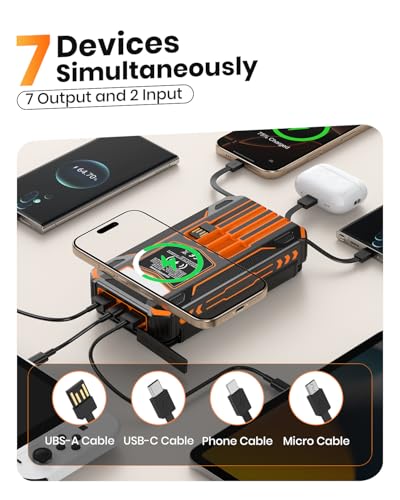
- A compatible charging cable, usually USB-C or Micro-USB
- A wall adapter or USB power source
- A clean, dry surface to place your power bank
Not all cables are the same. I learned this the hard way when I used a frayed old cable and it barely charged my power bank overnight. Since then, I always keep a spare good-quality cable in my bag. A short, sturdy cable works best because it reduces power loss during charging.
Also, check the port on your power bank. Most modern ones use USB-C, but older models might still have Micro-USB. Using the wrong cable won't damage anything, but it simply won't work. So always match the port first.

Step-by-Step Guide: How to Charge the Power Bank
Charging a power bank is easy once you know the steps. Follow this simple process and you'll be good to go.
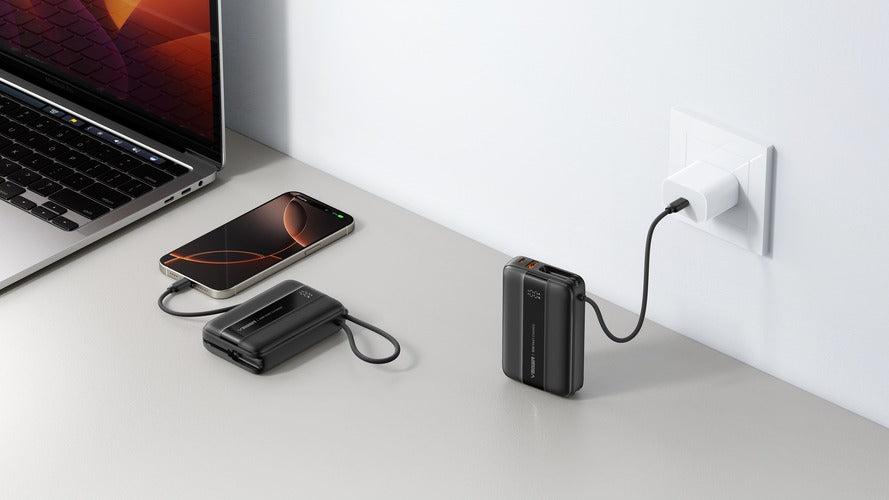
- Step 1: Locate the input port on your power bank. It's usually on the side or top.
- Step 2: Plug the correct end of your charging cable into the input port.
- Step 3: Connect the other end to a power source like a wall adapter, laptop, or car charger.
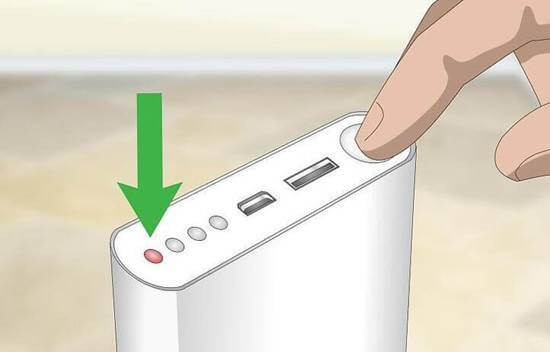
- Step 4: Look for the LED indicator lights. They usually blink or light up to show charging has started.
- Step 5: Leave it connected until the lights show it's full. Most power banks take 3 to 6 hours depending on capacity.
- Step 6: Unplug once fully charged to avoid overcharging.
I usually charge mine overnight while I sleep, but I make sure to use a smart plug that cuts power automatically. It's a small trick that keeps the battery healthy in the long run.
Choosing the Right Charger and Cable
The charger and cable you use matter more than you think. They affect how fast your power bank charges and how long the battery stays healthy.
Here are some tips to keep in mind:
- Use a wall adapter with at least 2A output for faster charging.
- Pick a cable that supports your power bank's input rating.
- Avoid super cheap cables from unknown brands. They can overheat or fail.
- If your power bank supports fast charging, use a compatible fast charger.
I once used a 1A phone charger to fill a 20,000mAh power bank. It took nearly 12 hours. When I switched to a 2.4A adapter, the same power bank charged in under 5 hours. That experience taught me to always check the output rating before plugging in.
Also, make sure the cable isn't too long. Longer cables can sometimes slow down charging because of resistance. A 1-meter cable is usually the sweet spot.

How Long Does It Take to Charge a Power Bank
Charging time depends on three things: the capacity of the power bank, the output of your charger, and the quality of your cable. A small 5,000mAh power bank might charge in 2 to 3 hours. A bigger 20,000mAh one can take 6 to 10 hours.
Here's a quick breakdown:
- 5,000mAh: 2 to 3 hours with a 2A charger
- 10,000mAh: 4 to 5 hours with a 2A charger
- 20,000mAh: 6 to 10 hours with a 2A charger
If you're in a hurry, fast charging can cut these times by half. But keep in mind that fast charging generates more heat, which can slowly wear out the battery. I usually stick to normal charging unless I'm in a rush.
Common Mistakes to Avoid When Charging a Power Bank
Even though charging a power bank seems simple, there are a few mistakes that can shorten its life. I've made some of these myself, so learn from my experience.
Here are the most common ones:
- Using a damaged or low-quality cable
- Charging on soft surfaces like beds or couches that trap heat
- Leaving it plugged in for days after it's full
- Using a charger with too low or too high output
- Exposing it to extreme heat or cold while charging
Heat is the biggest enemy of lithium batteries. I once left my power bank charging on a windowsill during summer. It got so hot I could barely touch it. Since then, I always charge on a hard, cool surface. It's a simple habit that protects the battery.
Tips to Make Your Power Bank Last Longer
A good power bank can last for years if you treat it right. Here are some easy tips to extend its life.
- Charge it before it drops below 20 percent
- Don't leave it at 100 percent for too long
- Store it in a cool, dry place when not in use
- Use it at least once a month to keep the battery active
- Avoid dropping or bending it
Think of your power bank like a small pet. It needs regular care, good food (charge), and a comfy environment. If you ignore it for months, the battery can degrade faster.

Can You Charge a Power Bank with a Phone
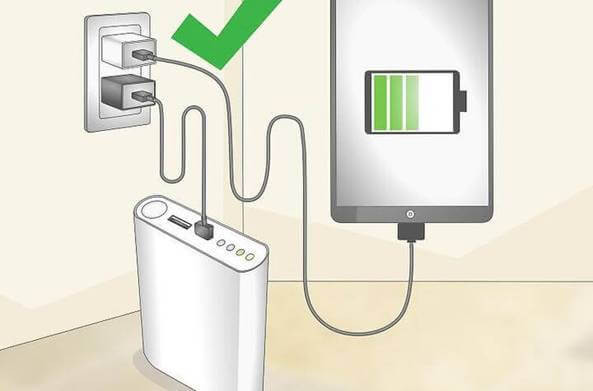
Yes, you can charge a power bank with a phone in some cases, but it's not ideal. Some power banks support pass-through charging, which means you can charge the power bank and a device at the same time. But this puts extra stress on the battery and generates more heat.
If you need to do it, make sure:
- Your power bank supports pass-through charging
- You're using a good quality cable
- You're not doing it too often
I only use pass-through charging in emergencies, like when I'm traveling and have only one power outlet. For everyday use, I prefer to charge them separately.
Safety Tips While Charging a Power Bank
Safety should always come first. Power banks are generally safe, but like any electronic device, they can cause problems if misused.
Here are a few safety tips:
- Never charge a swollen or damaged power bank
- Keep it away from water and liquids
- Don't charge it near flammable materials
- Unplug it if it gets too hot
- Use only certified cables and adapters
I once had a power bank that started smelling weird while charging. I immediately unplugged it and stopped using it. Turns out the battery was swelling inside. It could have been dangerous. So always trust your senses. If something feels off, stop using it.

Signs Your Power Bank Is Fully Charged
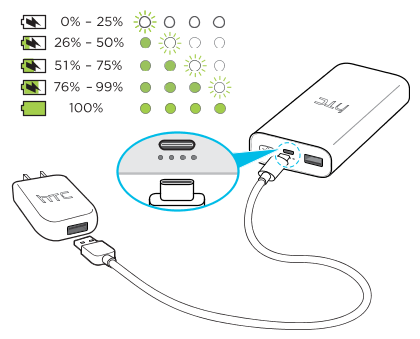
Most power banks have LED lights that show the charge level. Here's what they usually mean:
- One light blinking: 0 to 25 percent
- Two lights: 25 to 50 percent
- Three lights: 50 to 75 percent
- All lights solid: 75 to 100 percent
Some modern power banks have digital displays that show the exact percentage. These are super handy and take the guesswork out. When all lights are solid or the display reads 100 percent, it's time to unplug.
How to Store a Power Bank When Not in Use
If you're not using your power bank for a while, store it properly. Don't leave it in a hot car or a damp drawer. Instead:
- Charge it to around 50 percent before storing
- Keep it in a cool, dry place
- Recharge it every 3 months to keep the battery healthy
- Use a protective case if you have one
A friend of mine stored his power bank in a drawer for a year without charging it. When he finally picked it up, it wouldn't turn on. The battery had drained completely and died. So even when not in use, give it a little charge now and then.
Best Practices for First-Time Charging
When you buy a new power bank, you might be tempted to use it right away. But a little patience goes a long way.
Here's what to do:
- Fully charge it before first use
- Use the cable that came in the box if possible
- Don't use it while it's charging for the first time
- Let it cool down before plugging it in
Most new power banks come with about 50 to 70 percent charge out of the box. It's fine to use that, but a full first charge helps calibrate the battery and gives you a more accurate reading of its capacity.
Frequently Asked Questions
Can I charge my power bank overnight?
Yes, you can charge it overnight, but make sure you're using a good quality charger and a smart plug if possible. Modern power banks have overcharge protection, but it's still better to unplug once it's full to keep the battery healthy.
Is it okay to use my phone while the power bank is charging?
It's not recommended because it generates extra heat and can slow down charging. If you must do it, make sure both devices are on a hard, cool surface and use a good cable.
Why is my power bank charging so slowly?
Slow charging is usually caused by a low-output charger, a damaged cable, or a dirty port. Try using a 2A adapter and a new cable to see if the speed improves.
Can I use any USB cable to charge my power bank?
No, you need a cable that matches the input port of your power bank. Most use USB-C or Micro-USB. Using the wrong cable will either not work or charge very slowly.
How do I know if my power bank is broken?
Common signs include not charging at all, swelling, overheating, or draining very fast. If you notice any of these, stop using it and consider replacing it.
Wrapping It All Up
Charging a power bank is easy, but doing it the right way keeps it working longer. Start by using a good cable and a proper charger. Avoid heat, don't overcharge, and store it well when not in use. A little care goes a long way.
Think of your power bank as a small investment. Treat it well, and it will keep your devices powered for years. If you found this guide helpful, share it with a friend or drop a comment below with your own tips. I'd love to hear how you keep your power bank in top shape.