How Does Fast Charging Work? A Simple Guide to Fast Charging Technology
If you use a modern iPhone, Android phone, tablet, laptop, or other USB-C device, you have likely seen the words fast charge. The basic idea is simple: send more power into the battery in less time. The hard part is doing that without creating too much heat or pushing the battery beyond its safe limits.
So, how does fast charging work in real life? The charger does not simply force as much electricity as possible into the battery. The charger and device communicate, agree on a safe power level, and then adjust that level as the battery charges. This is why a phone may charge very quickly from a low level but slow down near full.
The same basic idea applies across many charging systems, but the details vary. USB Power Delivery, Qualcomm Quick Charge, and other systems can use different voltage and current levels. In this guide, we will break down the process in plain English and explain what matters when you buy a charger in the U.S.

What Is Fast Charging?
Fast charging means charging a battery at a higher power level than a basic charging system. Power is measured in watts, or W. In simple terms, watts tell us how much electrical power the charger can deliver at a given moment.
A basic USB charger may provide only a small amount of power. A modern USB-C charger can provide much more. Some phones support charging in the tens of watts, while some laptops and other devices can use well over 100 watts.
However, the charger’s maximum watt rating does not mean your device will always receive that amount. The device sets limits based on its charging system, battery level, temperature, and design.
- ✦ Voltage
Voltage is the electrical pressure that helps move charge through a circuit. Fast charging systems can use higher voltage than older basic USB charging systems.
- ✦ Current
Current is the flow of electric charge, measured in amps. More current can increase charging power, but it can also create more heat.
- ✦ Power
Power is measured in watts and can be understood with the basic relationship watts = volts × amps. Fast charging can raise power by changing voltage, current, or both.
Why More Watts Can Mean Faster Charging
Think of electrical power as the rate at which energy moves into the device. If a phone can safely accept more watts, it can put more energy into its battery over the same period.
That does not make charging speed perfectly linear. Battery temperature, battery chemistry, charging limits, and the current state of charge all affect the real result.
- ✦ Higher power
More usable power can reduce the time needed to add energy to a battery.
- ✦ Device limit
A device only takes the power it is designed to handle, even when you connect a charger with a higher watt rating.
How Does Fast Charging Work Step by Step?
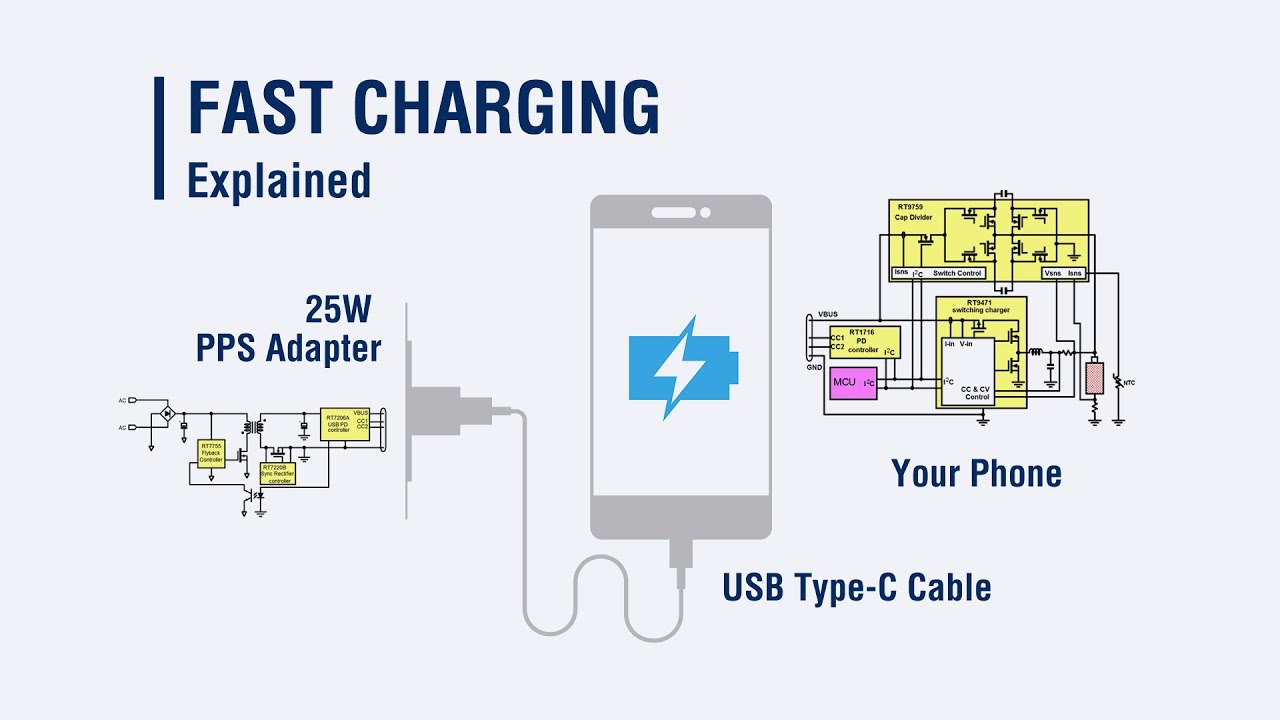
To understand how does fast charging work, it helps to follow the path from the wall outlet to the battery. In a typical U.S. setup, AC power from a wall outlet reaches the charger. The charger converts and controls that power before sending suitable DC power through the cable to the device.
The device then checks the available power and its own limits. Modern charging systems can use communication between the charger and device to choose a suitable voltage and current level. The battery management system then controls how much energy actually enters the battery.
As charging continues, the device can change the power level. It may allow high power when the battery is low and reduce power as the battery gets closer to full. This changing process is a key reason fast charging does not stay at its advertised peak for the entire session.
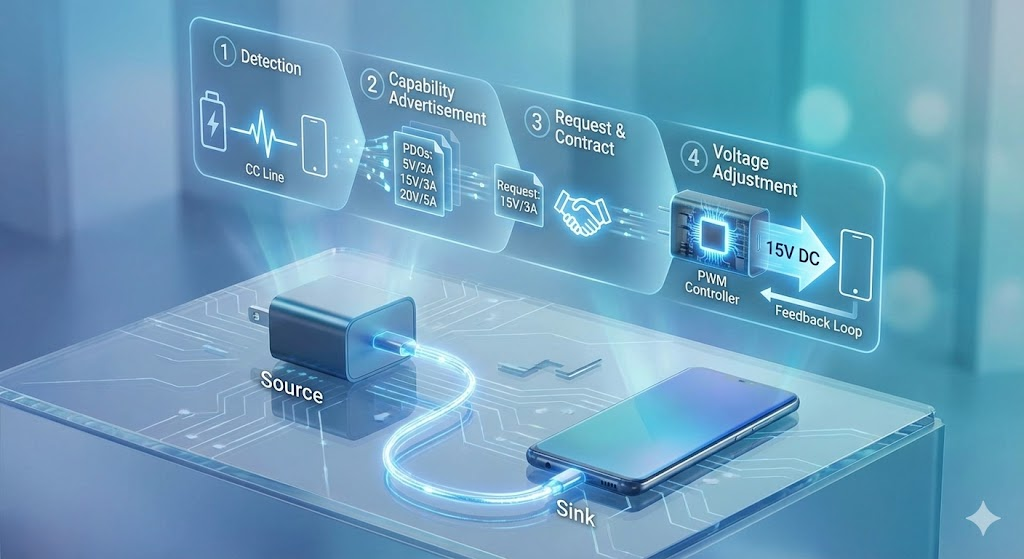
- ✦ Step 1: Wall power enters the charger
The charger receives AC power from the electrical outlet and converts it into controlled DC power suitable for the device.
- ✦ Step 2: Charger and device communicate
The charging system identifies supported power levels and selects a suitable charging mode.
- ✦ Step 3: The device controls the input
The phone or other device regulates the power that reaches the battery instead of allowing unlimited current.
- ✦ Step 4: Sensors watch conditions
Temperature, battery voltage, state of charge, and other conditions help the system decide whether to raise, hold, or reduce charging power.
- ✦ Step 5: Charging slows near full
The system usually reduces power as the battery approaches a high state of charge to protect the battery and control heat.
The Charger Does Not Force Power Into the Battery
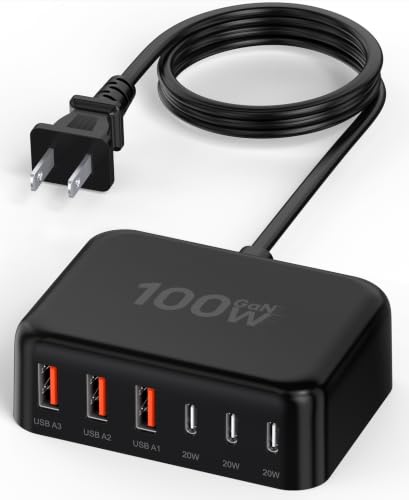
A common misunderstanding is that a 100W charger will push 100W into every phone. It does not work that way. The charger can offer a certain amount of power, but the device decides what it can safely use.
For example, connecting a compatible phone that supports a lower power level to a higher-rated charger does not normally make the phone charge at the charger’s maximum rating. The phone requests or accepts a supported level.
- ✦ Charger rating
This describes how much power the charger can provide under supported conditions.
- ✦ Device rating
This describes how much power the device can accept through its charging system.
- ✦ Actual charging power
This is the power used at that moment and can change throughout the charging session.
The Role of Voltage, Current, and Watts
The words volts, amps, and watts appear on many chargers, but they describe different parts of the same electrical system. Voltage measures electrical pressure. Current measures the flow of electric charge. Watts measure power.
The basic formula is simple: power in watts equals voltage in volts multiplied by current in amps. For example, 20 volts at 3 amps gives 60 watts. This formula helps explain why fast charging can use different combinations of voltage and current.
Raising current can create more heat in cables and electronic parts. Raising voltage can help deliver more power without requiring the same high current. Modern charging systems use power conversion and control circuits to manage these trade-offs.

- ✦ 5V × 3A
This produces 15W of electrical power under ideal conditions.
- ✦ 9V × 3A
This produces 27W under ideal conditions.
- ✦ 20V × 3A
This produces 60W under ideal conditions.
Why Cable Quality Matters
A charging cable is part of the power path. Its design, current rating, connector, length, and quality can affect what charging modes are available. USB-C cables may look similar while supporting different power and data capabilities.
For higher-power USB-C charging, the charger and cable may use USB Power Delivery features that help identify supported power levels. Some higher-power USB-C applications also require electronically marked cables so the system can safely support the intended current.
- ✦ Use a suitable cable
Choose a cable that supports the power level and charging standard required by your device.
- ✦ Avoid damaged cables
Frayed, bent, or damaged cables can create safety and performance problems.
What Is USB Power Delivery and Why Does It Matter?
USB Power Delivery, often called USB PD, is a major fast charging standard used with USB-C devices. It allows compatible devices and chargers to negotiate suitable power levels rather than relying on one fixed charging mode.
USB PD can support a wide range of power levels. This makes it useful for phones, tablets, handheld devices, monitors, and laptops. A single USB-C PD charger can therefore serve several types of devices when the charger, cable, and device all support the needed features.
USB PD has also evolved over time. Newer versions can support higher power levels for compatible equipment, but the actual charging speed still depends on the device and its design.

- ✦ Negotiated power
The charger and device can agree on a supported power level rather than using maximum power by default.
- ✦ One charger, many devices
A suitable USB-C PD charger can often charge phones, tablets, and laptops with different power needs.
- ✦ Safety control
Power negotiation helps the charging system select a supported operating point instead of blindly applying the charger’s maximum output.
USB-C Is Not the Same as USB Power Delivery
USB-C describes a connector and interface. USB Power Delivery is a charging and power-management protocol that can run over USB-C. A USB-C port does not automatically mean that a device supports every USB PD feature or every high-power charging level.
When shopping for a fast charger, check the device specifications and the charger’s supported standards. The shape of the connector alone does not tell you the maximum charging speed.
- ✦ USB-C
A connector and interface used by many modern devices.
- ✦ USB PD
A power delivery standard that supports negotiated charging modes over compatible connections.
Why Fast Charging Slows Down Near 100 Percent
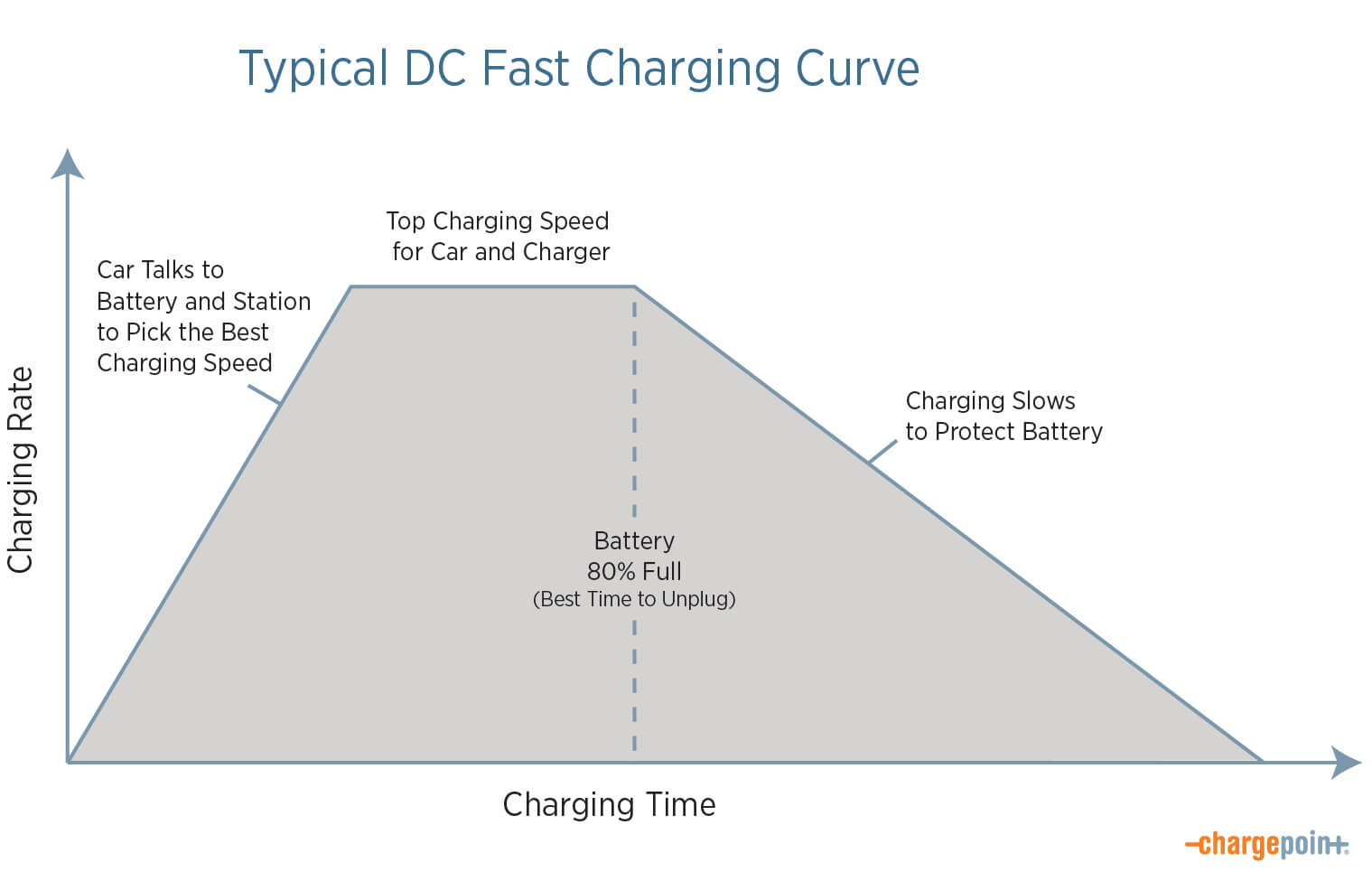
One of the most important parts of understanding how does fast charging work is the charging curve. A battery does not accept the same power level from empty to full. Lithium-ion batteries usually charge quickly during the early part of a session, then charging power falls as the battery reaches a high state of charge.
This approach helps manage battery voltage, temperature, and chemical stress. The exact control method varies by battery and device, but the general pattern is easy to see: high power early, lower power later.
That is why a phone may gain a large amount of charge during a short break but need much longer to reach the final few percentage points. The last part is not simply wasted time. It is a controlled stage of the charging process.
- ✦ Low battery
The battery can often accept relatively high charging power when its state of charge is low and conditions are suitable.
- ✦ Middle range
The system may maintain a high charging rate for part of the session, depending on temperature and battery design.
- ✦ High battery level
Charging power usually falls as the battery approaches full to control voltage, heat, and battery stress.
Why Charging Curves Matter More Than Peak Wattage
A charger advertisement may highlight a peak number such as 67W, 100W, or another rating. That number does not tell the whole story. What matters in daily use is how long the device can sustain useful power and how efficiently the system turns that power into stored battery energy.
For a person rushing out the door in the morning, the amount of charge gained during the first 15 or 30 minutes can be more useful than the time needed to reach 100 percent.
- ✦ Peak power
The highest power level the system may reach under suitable conditions.
- ✦ Sustained power
The power level maintained over a longer part of the charging session.
- ✦ Real-world result
The amount of battery energy added during the time you actually have available.
How Heat Affects Fast Charging
Heat is one of the main limits on fast charging. Higher power can increase heat in the charger, cable, charging circuitry, and battery. If the system becomes too warm, the device can reduce charging power to protect the hardware and battery.
This is why fast charging may feel slower when a phone is hot. Using demanding apps, gaming, recording video, leaving the phone in direct sun, or charging in a warm room can all raise device temperature.
Modern devices use sensors and software to monitor temperature. The charging system can then reduce power when needed. This can make charging slower, but it is an important safety and battery-management feature.
- ✦ Room temperature
A cooler, normal indoor environment generally gives the charging system more room to operate at its intended power level.
- ✦ Phone workload
Gaming, video capture, navigation, and other demanding tasks can add heat while the phone charges.
- ✦ Thermal control
The phone can reduce charging power when temperatures rise beyond its preferred range.
- ✦ Charging accessories
The charger and cable also generate heat, especially at higher power levels.
A Simple Way to Get Better Fast-Charging Results
If your phone charges slowly, start with temperature and accessories before assuming the battery is defective. Remove heavy workloads, keep the device out of direct heat, and use a charger and cable that match the manufacturer’s requirements.
For many people, the best charging habit is simple: plug in when needed, use reliable accessories, and let the device manage the charging process.
- ✦ Keep it cool
Avoid charging a hot device in direct sunlight or under heavy workloads when possible.
- ✦ Use proper accessories
Choose reputable chargers and cables with suitable power ratings and safety features.
Does Fast Charging Damage Your Battery?
Fast charging does not automatically damage a battery. Modern phones and other devices use charging controls designed to manage voltage, current, temperature, and battery state. The bigger issue is that heat and long periods at high battery voltage can contribute to battery aging over time.
Battery wear is a normal part of lithium-ion battery use. Capacity gradually falls after repeated use and charging. Fast charging can be one factor in that aging process, especially when it creates more heat, but it is not accurate to say that every fast charge will harm a battery.
Manufacturers may also use features such as optimized charging, charge limits, or adaptive charging. These features can reduce the amount of time a battery spends at a very high state of charge.
- ✦ Heat matters
Repeated exposure to high temperatures can increase battery aging.
- ✦ Battery level matters
The system normally changes charging behavior as the battery approaches a high state of charge.
- ✦ Charge management matters
Software can limit or delay charging in some situations to reduce battery stress.
- ✦ Battery aging is normal
Lithium-ion batteries lose some capacity over time even when used under normal conditions.
Should You Avoid Fast Charging Every Day?
For most users, there is no need to avoid fast charging simply because it is fast. A modern device is designed to manage supported charging levels. If you need a quick boost before leaving home or work, fast charging can be a useful feature.
If maximum battery longevity is your top concern, use built-in charging optimization or a charge limit when your device provides one. Keeping the device reasonably cool is also more useful than worrying about the word fast on the charger.
- ✦ Daily use
Use supported fast charging when it fits your routine.
- ✦ Long-term care
Focus on avoiding excessive heat and use battery-management features when available.
Fast Charging Standards You May See
Fast charging is not one single technology. Different manufacturers and industry groups have developed charging standards and systems. Some are widely compatible, while others work best with specific devices and chargers.
USB Power Delivery is especially important in the modern USB-C ecosystem. Other systems, such as Qualcomm Quick Charge and manufacturer-specific fast charging systems, can use their own approaches and may offer different power levels or charging behavior.
Compatibility matters more than the biggest number printed on the charger. A charger needs to support a charging mode that the device can use, and the cable may also need to meet the required specifications.
- ✦ USB Power Delivery
A widely used USB-C power standard that supports negotiated power levels across compatible devices.
- ✦ Qualcomm Quick Charge
A family of charging technologies used by some devices and chargers based on Qualcomm technologies.
- ✦ Manufacturer-specific systems
Some phone brands use proprietary or enhanced charging systems that can reach high power with compatible hardware.
- ✦ USB-C charging
USB-C is the connector type, not a guarantee of a particular fast charging speed.
Why a Fast Charger May Charge One Phone Faster Than Another
Two phones can use the same charger and cable but charge at different speeds. Each device has its own battery, charging circuitry, thermal limits, firmware, and supported charging protocols.
This is why buying a charger with the highest watt rating does not guarantee the fastest possible charge. The complete charging system must be compatible from the wall adapter to the cable and device.
- ✦ Device support
The phone must support the charging standard and power level.
- ✦ Protocol match
The charger and device need a compatible charging protocol for the intended fast mode.
- ✦ Cable support
The cable must support the required power level and current.
How Fast Charging Differs for Electric Vehicles
The term fast charging also applies to electric vehicles, but the system is much larger than a phone charger. In the U.S., EV drivers may encounter Level 2 AC charging at home or public sites and DC fast charging on road trips and other locations where a quick energy boost is useful.
With AC charging, the vehicle’s onboard charger converts incoming AC power to DC for the battery. With DC fast charging, the charging station supplies controlled DC power to the vehicle’s battery system, reducing the need for the vehicle’s onboard AC charger to perform that conversion.
EV fast charging also follows a charging curve. Power can be high when the battery is at a lower state of charge and then fall as the battery gets fuller. Temperature, battery condition, vehicle limits, and station capability all affect the actual charging rate.
- ✦ AC charging
AC power enters the vehicle and the onboard charger converts it to DC for the battery.
- ✦ DC fast charging
The charging station provides controlled DC power directly to the vehicle’s high-voltage battery system.
- ✦ Charging curve
EV charging power usually changes during the session rather than staying at the station’s maximum rating.
- ✦ Road-trip value
DC fast charging can add useful driving range during a short stop, which is especially helpful on long U.S. road trips.
Why EV Fast Charging Slows Near a High State of Charge
The same basic principle seen in phones applies to EV batteries. A vehicle may accept high power at a low or moderate state of charge, then reduce power as the battery approaches a high level.
For road trips, drivers often save time by treating fast charging as a quick energy stop rather than waiting for a full charge at every station. The best stopping point depends on the vehicle, route, weather, traffic, charger availability, and the next charging opportunity.
- ✦ High power early
The vehicle may accept strong charging power when battery conditions allow it.
- ✦ Lower power later
The vehicle reduces power as the battery approaches a high state of charge.
How to Choose a Fast Charger in the U.S.
Choosing a fast charger is easier when you focus on compatibility instead of the biggest watt number. For a phone or tablet, check the manufacturer’s charging specification first. Then choose a reputable charger that supports the required standard and enough power.
USB-C Power Delivery is a useful option for many modern devices because it can support different power levels across a range of compatible products. For laptops, check the required wattage carefully because a charger that works well for a phone may not provide enough power for a laptop under load.
A good charger should also have appropriate electrical protections. Reputable brands typically provide protection against conditions such as over-current, over-voltage, and overheating, although the exact protection set varies by product.
- ✦ Check the device specification
Find the maximum supported charging power and supported protocols for your exact device.
- ✦ Check the charger output
Make sure the charger provides the voltage and power profiles your device can use.
- ✦ Check the cable
Use a cable rated for the required charging power and current.
- ✦ Buy from a reputable source
Avoid suspiciously cheap chargers with unclear specifications, poor labeling, or unknown safety testing.
What About GaN Chargers?
Gallium nitride, or GaN, is a semiconductor material used in some modern chargers. GaN power components can allow charger makers to build compact and efficient designs, especially at higher power levels.
GaN does not automatically mean faster charging. Charging speed still depends on the charger’s output, charging protocol, cable, and device. The main benefit may be a smaller charger that can deliver useful power efficiently.
- ✦ Smaller designs
GaN technology can help manufacturers build compact high-power chargers.
- ✦ Efficiency
GaN power electronics can support efficient power conversion in suitable charger designs.
Common Reasons Fast Charging Is Not Working
If a phone suddenly charges slowly, the charger itself may not be the problem. The device may be warm, the battery may already be near full, or the cable may not support the required power level.
Software can also change charging behavior. A device may reduce power because of temperature, battery protection settings, an optimized charging feature, or another condition. Testing with a known-compatible charger and cable can help isolate the cause.
- ✦ The charger is underpowered
A low-power adapter may not provide enough power for the device’s fastest charging mode.
- ✦ The cable is limiting power
A cable with lower power capability may prevent the device from using a higher charging mode.
- ✦ The device is too warm
Thermal protection can reduce charging power when the device temperature rises.
- ✦ The battery is nearly full
Charging normally slows at high states of charge.
- ✦ The protocol is not compatible
The charger may have a high watt rating but lack the charging mode required by the device.
- ✦ The port is dirty or damaged
Debris, moisture, or physical damage can interfere with a reliable connection and may trigger charging limits.
A Simple Troubleshooting Order
Start with the easiest checks. Try a known-good cable and compatible charger, let the device cool, and check whether a charging limit or optimized charging feature is active.
If the problem remains, inspect the charging port for visible debris or damage without using sharp tools inside it. If the device still will not charge at its normal rate, professional service may be appropriate.
- ✦ First
Check the charger, cable, outlet, and charging mode.
- ✦ Second
Let the device cool and stop demanding tasks while testing.
- ✦ Third
Check the device’s battery and charging settings.
- ✦ Fourth
Consider service if the charging problem continues with known-compatible accessories.