Best USB Charging Hub: Top Picks For Every Device
The best USB charging hub depends on your devices, power needs, and whether you need charging, data transfer, or both.
Your phone needs power, your tablet is almost dead, and your earbuds need a charge before you leave for work. Yet your desk has only one free outlet. This is a common problem in busy American homes, dorm rooms, and home offices. A USB charging hub can help by letting you power several devices from one central spot. Some models charge phones and tablets, while others also connect mice, keyboards, flash drives, and other gear to a computer. In this guide, I compare five options and explain what each one does best. I also cover the key limits to check before you buy.
🏆 Top 3 Products

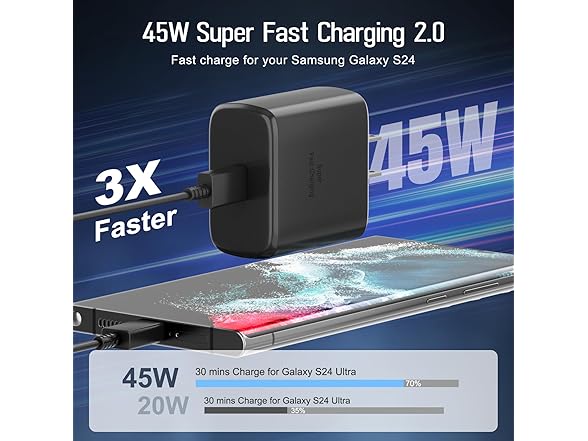
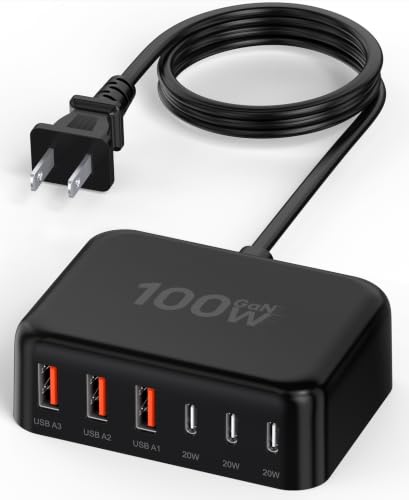
100W 6-in-1 USB Charging Hub
Its 100W power rating and mix of ports make it a strong choice for people who want a compact charging station for several devices.

TP-Link UH720 9-Port Powered USB Hub
It combines seven USB 3.0 data ports with two charging ports, making it useful for a busy computer desk.
10-Port USB-A Charging Station
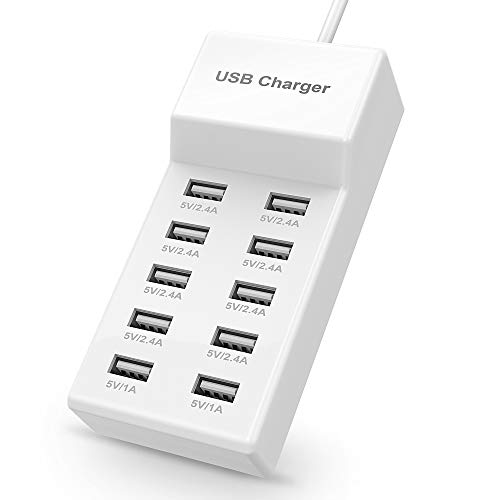
Its ten USB-A ports suit homes and shared spaces where several phones and small accessories need power at once.
10-Port USB-A Charging Station
This 10-port USB-A charging station aims to solve a simple problem: too many devices and too few charging ports. It can serve as a shared charging spot for phones, tablets, earbuds, and other small devices that use USB-A cables. Its many ports can help reduce the need for several separate wall chargers. The listed product title also states that the unit is UL listed, but buyers should confirm the exact model and certification before purchase.
I would consider this type of hub for a family room, shared office, classroom, or dorm where people charge several devices in one place. It uses USB-A ports, so it may not be the best match for newer devices that need USB-C Power Delivery for fast charging. The number of ports does not mean every connected device gets the same charging speed. Check the power rating and output details before relying on it to charge a full set of devices at once.
✅ Pros
- ✔ Ten USB-A ports provide space for several devices.
- ✔ Works with compatible USB-A charging cables.
- ✔ Can reduce the need for separate wall adapters.
- ✔ Useful for families with many phones and small gadgets.
- ✔ Can create one central charging area at home.
- ✔ May suit shared desks and dorm rooms.
- ✔ The listed title states that the product is UL listed; verify the certification for the exact unit.
⚠️ Cons
- ✖ It does not provide native USB-C ports.
- ✖ The listing does not establish the exact output available to each port.
- ✖ Ten ports do not guarantee ten devices will charge at full speed at once.
- ✖ It may not offer the USB-C Power Delivery features needed by some newer phones and tablets.
- ✖ You must supply compatible cables for your devices.
My Recommendation
I recommend this 10-port USB-A station for people who need many basic charging connections in one place. It is a practical choice if most of your devices still use USB-A cables and you value port count over advanced charging features. Before buying, check its total output, per-port limits, safety details, and physical size. If your main goal is to fast-charge newer USB-C phones or laptops, a USB-C charger with a clear Power Delivery rating may be a better fit.
| Best For | Why |
|---|---|
| Families | Ten USB-A ports give several family members one shared place to charge devices. |
| Dorm rooms | It can reduce the number of separate USB-A wall chargers needed for small electronics. |
| Shared workspaces | A central station can help keep phones and other small devices together while charging. |
Wenter 11-Port Powered USB Hub

The Wenter 11-port powered USB hub is designed for people who need to connect many USB devices to a computer. Its listed layout includes ten data transfer ports and one smart charging port. Individual LED indicators and on/off switches can help you control connected devices without unplugging each cable. A separate power adapter supplies power to the hub, which is useful when several accessories share the same connection point.
This model is better suited to a computer desk than to a simple phone-charging shelf. You may use a hub like this for a keyboard, mouse, printer, flash drive, and other USB accessories, as long as each device is supported. The one smart charging port is not the same as eleven dedicated high-speed charging ports. If you need to charge many phones at once, check the charging output carefully and compare it with a dedicated multiport charger.
✅ Pros
- ✔ Eleven ports provide room for many USB devices.
- ✔ Ten ports are listed for data transfer.
- ✔ One separate smart charging port supports charging use.
- ✔ Individual switches let you turn ports on or off.
- ✔ LED indicators make port status easier to see.
- ✔ The included power adapter helps supply power to connected devices.
- ✔ Useful for expanding the USB connections available at a compatible computer.
⚠️ Cons
- ✖ Only one port is listed as a smart charging port.
- ✖ It needs a separate power adapter and extra desk space.
- ✖ It is not a replacement for a USB-C laptop charger.
- ✖ Data speed and device support depend on the hub, host computer, cables, and connected devices.
- ✖ A large number of connected devices can make cable management harder.
My Recommendation
I would choose the Wenter hub for a desktop or laptop setup with many USB accessories. Its switches and status lights can make it easier to manage devices that stay connected all day. It is less suitable if you only want to charge phones and tablets, because its main strength is USB connectivity rather than a large bank of dedicated charging ports. Check your computer’s USB compatibility and the included power adapter details before ordering.
| Best For | Why |
|---|---|
| Desktop users | It adds ports for a keyboard, mouse, storage devices, and other compatible USB accessories. |
| Home offices | Individual switches help manage devices without removing their cables. |
| Accessory-heavy setups | Its ten data ports offer more connection options than a basic charging block. |
100W 6-in-1 USB-C Charging Hub
This compact 6-in-1 charging station is listed with a 100W power rating and a mix of ports that includes USB-C. It aims to provide several charging options without taking up as much space as a large group of separate adapters. That can make it useful on a work desk, bedside table, or while packing for a trip. Its listed compatibility includes phones, tablets, and other common personal devices.
For the best results, I would check how the hub shares its power among connected devices. A 100W total rating does not mean every port can deliver 100W at once. The exact USB-C output, supported charging standards, and number of ports should guide your choice. Also confirm whether the product can charge your laptop at the speed you need, since some laptops require a specific USB-C Power Delivery level.
✅ Pros
- ✔ A listed 100W rating offers a useful total power target.
- ✔ Six-in-one design can reduce clutter from separate chargers.
- ✔ USB-C support suits many newer phones and tablets.
- ✔ Compact size may fit small desks and bedside tables.
- ✔ Can serve as a shared charging point for several devices.
- ✔ Useful for home, office, and travel setups when the input voltage and plug suit the destination.
- ✔ The mix of ports may reduce the need for several different charging blocks.
⚠️ Cons
- ✖ The 100W rating does not guarantee 100W from each port.
- ✖ Actual charging speed depends on port limits, power sharing, and device support.
- ✖ The exact port layout and charging standards should be checked before purchase.
- ✖ It may not meet the power needs of every laptop.
- ✖ A compact hub may still require several cables and enough space for connected devices.
My Recommendation
This is my leading choice among the five listed products for people who want a compact charging hub with a stated 100W rating and USB-C support. It offers a useful balance of size and power for a mixed collection of personal devices. I would still verify its port-by-port output and USB-C Power Delivery support before using it with a laptop. For people who mainly need data ports for computer accessories, the Wenter or TP-Link hub is a better match.
| Best For | Why |
|---|---|
| Phone and tablet users | A multiport design can charge several common personal devices from one station. |
| Small desks | Its compact design can help keep a desk or bedside table tidy. |
| Frequent travelers | A single charging station may be easier to pack than several separate adapters, provided its plug and voltage support suit the trip. |
Anker PowerPort 6 60W USB Charger

The Anker PowerPort 6 is a six-port USB charging block with a listed total output of 60W. It is designed to charge several compatible devices from one wall-powered unit. Its simple layout can suit a desk, kitchen counter, or shared family charging spot. The product title lists support for devices from Apple, Samsung, LG, HTC, and other brands, though the correct cable and charging speed still depend on each device.
I see this as a straightforward choice for people who want a familiar USB-A charging setup rather than a hub for computer data. It can help cut down on the number of wall adapters around the home. However, its 60W total rating must be shared among connected devices, and it does not offer the same USB-C port options as newer chargers. Check the output details if you plan to charge several tablets or other devices that draw more power.
✅ Pros
- ✔ Six charging ports support several compatible devices.
- ✔ The listed 60W total output suits many everyday phone and accessory needs.
- ✔ A dedicated charging block keeps the setup simple.
- ✔ Can reduce the need for separate wall adapters.
- ✔ Useful for family rooms, desks, and bedside tables.
- ✔ The listed compatibility covers a range of phone and tablet brands.
- ✔ A good option for users who do not need computer data ports.
⚠️ Cons
- ✖ The total 60W output is shared across connected devices.
- ✖ It does not provide native USB-C ports.
- ✖ It is not a computer data hub for storage drives or other peripherals.
- ✖ Older charging designs may not offer the latest fast-charging standards.
- ✖ It may not deliver the power required by some laptops.
My Recommendation
I recommend the Anker PowerPort 6 for users who need a simple six-port charger for phones, earbuds, and compatible tablets. It is a sensible fit when USB-A meets your needs and you do not require a data hub. Before buying, check the available output per port and make sure your devices can charge at the rates it supports. If you want newer USB-C fast charging, consider the 100W 6-in-1 model instead.
| Best For | Why |
|---|---|
| Everyday phone charging | Six ports provide space for several phones and small USB-powered devices. |
| Family charging areas | One shared charging block can reduce the need for many individual adapters. |
| Simple desk setups | It focuses on charging rather than extra computer data features. |
TP-Link UH720 9-Port Powered USB Hub
The TP-Link UH720 is a powered USB hub with seven USB 3.0 data ports and two smart charging ports. This mix makes it useful for people who need both computer connections and a way to charge small devices. The listed package includes a 12V/4A power adapter and a power button. It is designed for use with Windows, Mac, Chrome, and Linux systems, though support may depend on the computer and its USB setup.
I would place this model on a home office desk where several accessories stay plugged in. The data ports can connect compatible devices such as keyboards, mice, flash drives, and other peripherals, while the two charging ports provide extra convenience. It is not the same as a modern USB-C docking station, and its charging ports may not suit every phone’s fastest charging mode. Check the product’s current specifications if you need a particular data speed or charging standard.
✅ Pros
- ✔ Nine ports provide a mix of data and charging options.
- ✔ Seven USB 3.0 ports support data transfer for compatible devices.
- ✔ Two smart charging ports add charging flexibility.
- ✔ The included 12V/4A power adapter supplies external power to the hub.
- ✔ A power button can make it easier to control the unit.
- ✔ Listed support covers Windows, Mac, Chrome, and Linux systems.
- ✔ Useful for users who need more computer ports and some charging support in one device.
⚠️ Cons
- ✖ It does not provide native USB-C data ports.
- ✖ The two charging ports may not deliver the fastest charging mode for every device.
- ✖ It requires an external power adapter and a free desk spot.
- ✖ USB 3.0 speed depends on the host computer, cables, and connected devices.
- ✖ It is more complex than a basic multiport charging block if you only need power.
My Recommendation
The TP-Link UH720 is one of the strongest options here for a computer-based workspace. I like the balance of seven data ports and two charging ports because it serves users who need more than a simple charger. It is especially useful when several peripherals remain connected to one computer. If you only want to charge a large number of phones, choose a dedicated charging station instead. Confirm that its ports and data speed match your computer and devices.
| Best For | Why |
|---|---|
| Home office users | It adds data ports for the accessories used in a daily computer setup. |
| Students | It can connect compatible USB accessories and offer two extra charging ports at a study desk. |
| Multi-device computer setups | It combines seven data ports with two charging ports in one powered unit. |
Final Verdict: Which Should You Buy?
For most users who want a compact station for several personal devices, I would start with the 100W 6-in-1 USB charging hub, provided its port-by-port output matches their needs. For computer accessories, the TP-Link UH720 offers a better mix of data and charging ports. The ten-port USB-A station is a useful option for homes that need many basic charging connections.
The best usb charging hub is the one that fits your devices, power needs, and space. Compare the port layout, charging standards, safety details, and current price before you buy. A little research can help you find a USB charging station that keeps your daily setup simple and tidy.
FAQs Of best usb charging hub
Q What is the best USB charging hub?
Q Can a USB charging hub charge several devices at once?
Q Can I use a USB charging hub to charge a laptop?
Q What is the difference between a charging hub and a powered USB data hub?
Q Is a USB charging hub safe to leave plugged in?