What is an earphone jack: Honest Review
You've plugged in a pair of earphones a thousand times. You probably never thought about what was actually happening inside that tiny metal tube. Most people don't, until something stops working, the wrong headset shows up, or the sound on one side mysteriously disappears.
So, what is an earphone jack, really? It's a cylindrical analog audio connector, standardized at 3.5 mm under the IEC 60603-11 specification, that carries a low-voltage electrical signal from your device to your headphones. As of 2026, that little socket still lives on laptops, gaming consoles, mixers, and a growing number of mid-range phones, even after a decade of flagships dropping it.
Let's break down what's going on inside it.
Quick Answer
An earphone jack is a 3.5 mm analog audio socket on a device. It sends stereo audio, and sometimes a microphone signal, from the source to your earphones. The most common type is a TRRS connector with four contact rings.
It is defined by the IEC 60603-11 standard. Most consumer devices use it for headphones, headsets, and line-level audio input.
Why This Matters: Getting the Earphone Jack Right
Here's the thing: the jack looks simple, but it's one of the few ports that blends analog signal, mechanical contact, and headset logic into a single connector. Get the pinout wrong and your mic won't work. Push the wrong impedance load through it and your drivers distort.
Crank the volume too high and you're risking your hearing long before anything visibly breaks.
In our research across audio forums and manufacturer documentation, the same handful of jack-related problems keep showing up year after year. They're almost always rooted in three things: pinout mismatch, impedance mismatch, or mechanical wear. Once you understand how the jack is built, those problems become very easy to diagnose.
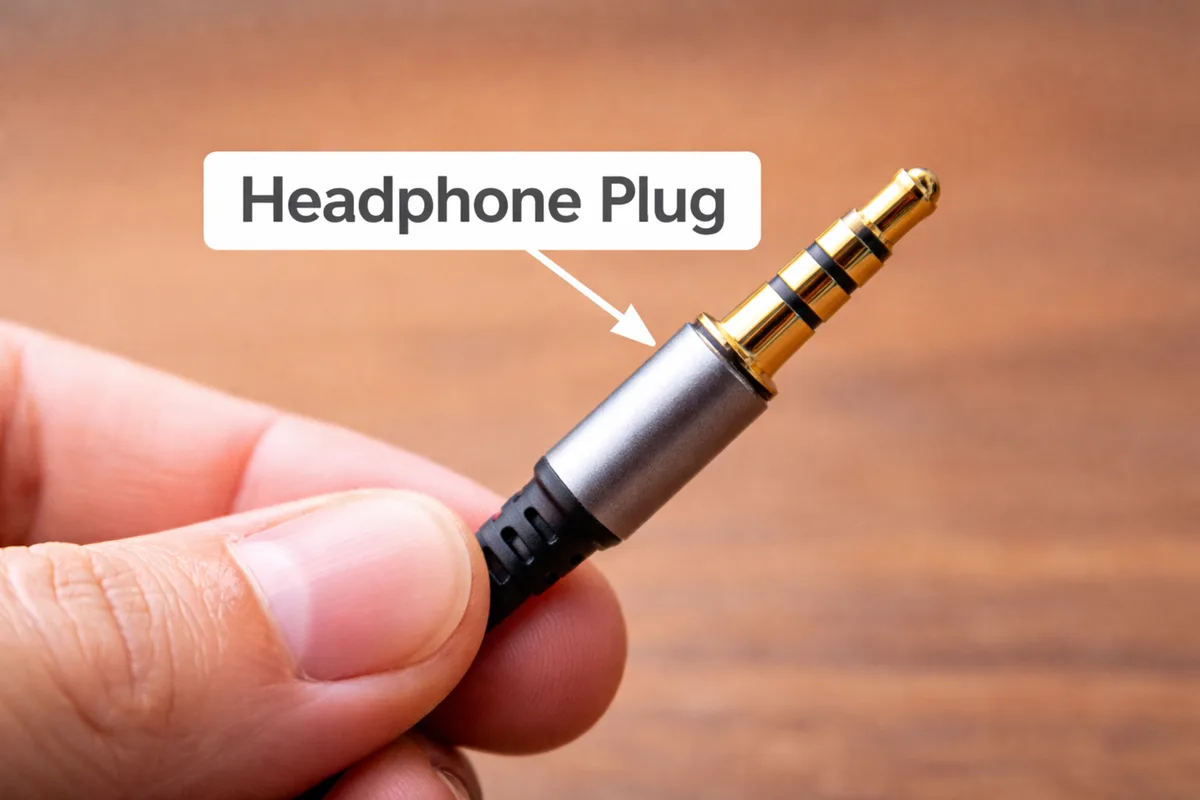
What an Earphone Jack Actually Is
Strip away the marketing, and the earphone jack is an analog audio socket. It accepts a cylindrical plug, makes electrical contact at specific points along the shaft, and routes those contacts to circuits inside your device.
The most common size is 3.5 mm, also called a mini-jack or 1/8-inch connector. It is the standard you'll find on phones, laptops, portable game consoles, and audio interfaces. Two other sizes still show up in the wild:
- 2.5 mm (sub-miniature): smaller, mostly seen on older cordless phone headsets and some aviation headsets.
- 6.35 mm (1/4 inch): larger, used in pro audio gear, electric guitars, and studio amplifiers.
The physical plug and the socket are governed by the IEC 60603-11 international standard, which defines dimensions, contact arrangement, and mechanical tolerances so that a plug from one manufacturer fits a socket from another.
The jack's job is simple in concept: it converts the electrical signal traveling through a copper cable into sound your earphone drivers can turn into air pressure. But because the same physical connector can carry different combinations of signals (left audio, right audio, microphone, ground), it has to be carefully designed. That's where the contact rings come in.
The Anatomy of a 3.5 mm Connector (TRS vs TRRS)
The plug going into your earphone jack isn't just a metal stick. It's a stack of precisely spaced conductive rings, separated by thin insulating bands. Each ring touches a separate spring contact inside the socket, and each contact is wired to a different circuit.
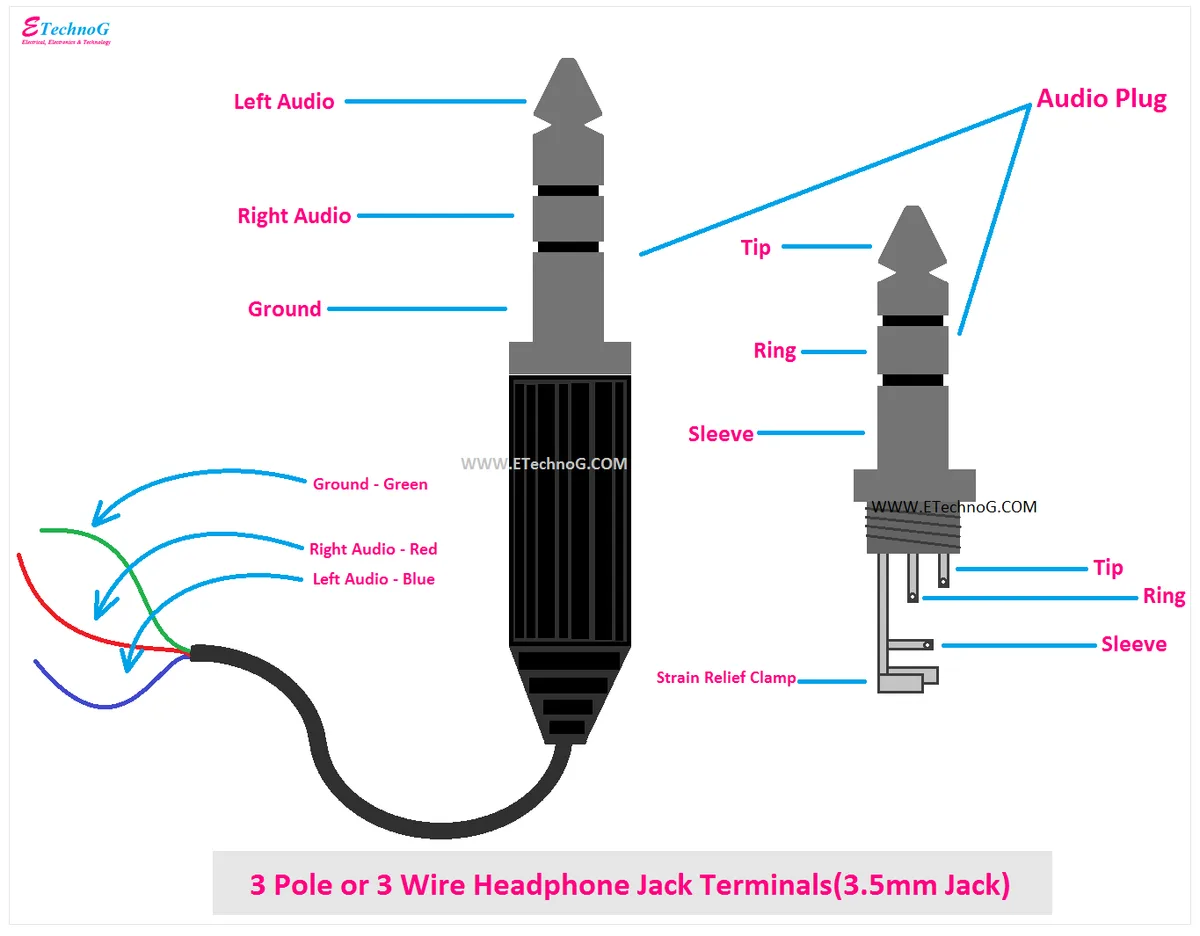
TRS: Three-Conductor Plugs
A TRS plug has three contact sections:
- Tip: left audio channel
- Ring: right audio channel
- Sleeve: shared ground
You'll find TRS on standard stereo headphones, line-level audio cables, and guitar patch cables. It carries analog audio in both directions, but no microphone.
TRRS: Four-Conductor Plugs
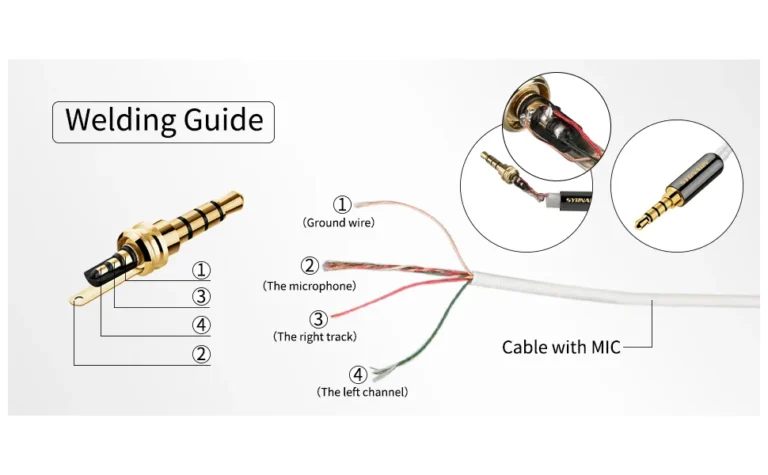
A TRRS plug adds one more ring, which carries a microphone signal or a balanced audio return. Four contact sections, in order from the tip:
- Tip: left audio
- Ring 1: right audio
- Ring 2: microphone (or shared audio return)
- Sleeve: ground
This is the plug on virtually every modern smartphone headset, gaming headset, and laptop combo headset. It's also the plug that triggers the headset mode on phones and laptops, where the device detects the extra contact and routes microphone audio accordingly.
Mechanical Build Matters
Two specs separate a cheap plug from a reliable one:
- Contact plating: gold over nickel resists corrosion best. Pure nickel is cheaper but tarnishes faster, especially with skin oils and sweat.
- Insertion lifespan: quality sockets are rated for 5,000 to 10,000 insertion cycles. Cheap ones wear out faster, and the spring contacts lose tension, causing crackle or intermittent audio.
Manufacturer specifications confirm that the gold layer is typically just 1 to 3 microinches thick over a nickel underplate. That sounds tiny, but it's enough to keep the contacts oxidation-free for years if you don't abuse them.
Why the Tip/Ring/Sleeve Design Is So Durable
The cylindrical design is mechanically robust. The plug self-centers as you push it in, the spring contacts wipe lightly across the rings with each insertion, and the geometry prevents misalignment. It's one of the few connector designs that's survived largely unchanged for 60 years.
The Two Pinout Standards: CTIA vs OMTP
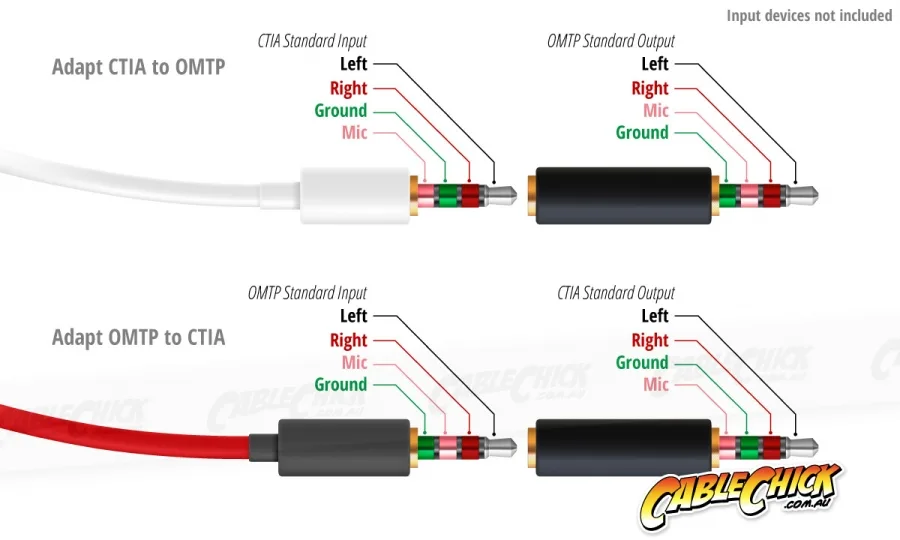
Here's the part most people never learn until something breaks. A TRRS plug has four contacts, but the world has never agreed on what each contact does. Two standards exist, and they're not compatible for microphone functions.
CTIA (also called AHJ)
CTIA is the standard used by Apple, most modern Android phones, and most current laptops. From tip to sleeve:
- Left audio
- Right audio
- Ground
- Microphone
OMTP
OMTP was the older standard, more common on phones made before roughly 2013, especially from Nokia, older Samsung, and some Chinese manufacturers. From tip to sleeve:
- Left audio
- Right audio
- Microphone
- Ground
Notice that mic and ground swap places between the two. That's why a headset bought for an older Nokia phone sometimes gives you audio but no working mic on a modern iPhone. The audio channels match, but the mic and ground are reversed.
What Happens If You Mismatch
Plug an OMTP headset into a CTIA device, or vice versa, and you'll get:
- Audio works fine in both ears (those contacts line up).
- Microphone is either dead, extremely quiet, or shorted to ground.
- In some cases, the device won't detect a headset at all.
The fix is a small TRRS adapter that swaps the mic and ground contacts. They're cheap, and they save you from throwing out a perfectly good headset.
Regional Notes
OMTP was more widely adopted in mainland China and parts of Europe before 2013. CTIA became the de facto standard worldwide once Apple adopted it on the iPhone in the late 2000s. As of 2026, CTIA is what you'll find on essentially every consumer device shipping today, but plenty of older OMTP headsets still circulate in the secondhand market.
How the Signal Travels From Jack to Driver
Once the plug is seated, here's the path the audio takes:
- Your device's DAC turns a digital audio file into a low-voltage analog waveform.
- That waveform is amplified by the device's headphone amp, typically delivering 30 to 40 mW per channel from a smartphone output.
- The signal travels through the cable to the earphone's driver, which is essentially a tiny speaker.
- The driver moves a diaphragm back and forth in response to the waveform, creating sound waves your ears pick up.
For TRRS headsets, the microphone path runs in the opposite direction. Your voice moves a small mic capsule, which generates a tiny electrical signal. That signal travels back through the mic and ground contacts, into the device's microphone preamp, and gets digitized for calls or recordings.
Why This Matters for Compatibility
The whole chain has to be impedance-matched for clean sound. Plug a high-impedance studio headphone (say, 250 ohms) into a phone designed for 16 to 32 ohm earbuds, and you'll barely get any volume. Push a sensitive earbud with too much voltage, and you'll fry the driver or clip the signal badly.
If you're curious about how devices handle power delivery for charging and accessories, our guide on selecting the right portable charger covers similar matching principles for voltage and current.
Why Jack Size Matters: 2.5 mm, 3.5 mm, and 6.35 mm
You can't just shove any plug into any socket. The diameter has to match, because the spring contacts inside the socket are sized for a specific shaft width.
3.5 mm: The Consumer Default
This is what you'll see on virtually every phone, laptop, tablet, and portable music player still shipping today. It balances size, durability, and signal quality well enough for casual listening. If you've ever owned a pair of wired earbuds, you've used a 3.5 mm jack.
6.35 mm: Pro Audio Standard
Studios, mixers, electric guitars, and high-end headphone amps use the larger 1/4-inch jack. Why? More surface area on the contact rings, stronger mechanical grip, and better shielding for long cable runs.
The trade-off is size: a 6.35 mm socket won't fit on a phone.
If you need to bridge the two, a simple 1/4-inch to 1/8-inch adapter does the job for passive headphones. For high-impedance studio cans, you also need a dedicated headphone amp between the source and the headphones, otherwise the source can't drive them properly.
2.5 mm: The Niche Survivor
The sub-mini 2.5 mm jack is mostly nostalgia now. You'll find it on older cordless phone headsets, some aviation intercom systems, and a few specialized communication headsets. Adapters from 2.5 mm to 3.5 mm exist, but they're not always reliable, since some 2.5 mm plugs use a non-standard pinout.
Impedance Matching: Why Your Headphones Sound Quiet or Distorted
This is the single most common "why don't my new headphones sound right" problem, and it has nothing to do with the jack being broken. It's an impedance mismatch.
What Headphone Impedance Means
Impedance is the resistance your headphones present to the amplifier driving them. It's measured in ohms. Lower impedance (16 to 32 ohms) means easier to drive, more current draw, less voltage needed.
Higher impedance (250 to 600 ohms) means harder to drive, but better damping and often cleaner transient response when properly amplified.
How Mobile Devices Are Tuned
Most smartphones and laptops deliver around 30 to 40 mW per channel at roughly 1 volt RMS output. That's plenty for earbuds and most consumer headphones, which sit in the 16 to 80 ohm sweet spot. Push the limits, and you'll hear the problem.
What Happens When You Mismatch
Plug 600 ohm studio headphones into a phone, and you'll get sound, but it'll be quiet, thin, and missing bass. The phone simply can't push enough voltage to drive them.
Plug 16 ohm earbuds into a powerful studio amp, and you'll get blasting volume plus audible distortion, because the amp has no trouble driving them, and you can easily overpower the drivers.
The Safe Range
Manufacturer guidance and aggregate user reviews consistently recommend keeping headphone impedance between 16 and 80 ohms for mobile use. Above 150 ohms, plan on using an external headphone amplifier.
If you're curious about how matching devices to their loads works in other contexts, our overview of portable power bank specs uses the same input/output matching logic. Audio is just voltage and current over a wire, after all.
Real-World Use Cases: Phones, PCs, Consoles, and Studio Gear
The 3.5 mm jack is more versatile than it gets credit for. Different devices just use the same connector for different jobs.
Phones
Most modern phones that still include a jack use a TRRS combo port. It handles stereo audio out and mono mic in, all through one socket. Apple kept the jack on base iPhones until 2016, and a handful of Android flagships still ship with one as of 2026.
Laptops and PCs
PCs often split audio across two jacks: a green line-out for headphones or speakers, and a pink mic-in. Higher-end laptops and ultrabooks usually combine them into a single TRRS combo port that auto-detects what you've plugged in.
Gaming Consoles
The Nintendo Switch, Steam Deck, and most handheld PCs use a 3.5 mm TRRS jack for stereo audio and the headset microphone. Sony's PlayStation controllers often route audio through a 3.5 mm jack on the controller itself.
Pro Audio and Studio Gear
Mixers, audio interfaces, and field recorders use 6.35 mm TRS jacks for balanced line signals, and 3.5 mm for consumer line-level input. Some interfaces also include a 3.5 mm combo jack for headsets.
Microphone-Only Setups
Lavalier mics and headset mics with a 3.5 mm TRS plug are common for podcasters and video creators. Just remember that a mic-only plug has a different impedance profile than a headphone plug, and won't drive drivers properly if you accidentally route it to a headphone output.
Risks of Mismatched Connections (Damage to Drivers, Hearing Safety)
Wired audio is forgiving, but it's not indestructible. Two risks stand out: hardware damage and hearing damage.
Hardware Risk: Too Much Power
If you run a sensitive in-ear monitor through a studio headphone amp at full gain, you can fry the driver in seconds. The voice coil overheats, the diaphragm deforms, and you get permanent distortion or silence. Always start at zero volume and ramp up.
If you're using a TRRS headset with a mic, you can also damage the mic capsule by feeding it phantom power. Most combo jacks don't supply phantom power, but some audio interfaces do. Check the spec before plugging in.
Hearing Risk: Sustained High Volume
The World Health Organization estimates that over 1 billion young people are at risk of hearing loss from unsafe listening habits. The widely cited safe exposure threshold is 85 dB for no more than 8 hours, with volume lowering the safe duration dramatically.
The EN 50332 European standard caps portable audio devices at roughly 100 dB SPL to limit accidental hearing damage. Some phones add software volume warnings or hard caps in EU markets.
Practical Tip
If your earbuds sound "quiet" at 50% volume, don't crank them to 100%. That's a sign of an impedance mismatch, and louder doesn't fix it, it just damages your hearing. The fix is a proper amp, better impedance matching, or a different pair of headphones.
Common Earphone Jack Problems and What They Mean
Most jack failures fall into a small handful of patterns. If you can identify which one you've got, the fix is usually obvious.
Audio Only in One Ear
Almost always a loose connection, a bent plug tip, or a frayed cable near the strain relief. Try the same earphones in another device first. If the problem follows the headphones, it's the cable.
If it stays on one device, it's the socket.
Crackling or Static When Moving the Plug
The spring contacts inside the socket have lost tension, or there's debris (lint, dust, pocket fuzz) inside the port. A blast of compressed air often fixes this. If the spring contacts are physically bent, the socket needs replacement.
Microphone Not Detected
Nine times out of ten, this is a CTIA versus OMTP problem. The audio channels still line up, but the mic and ground contacts are reversed, so the device sees no mic. A TRRS adapter fixes it.
No Sound At All
Check the obvious first: volume, mute toggle, audio routing in software. If that's clean, test with another pair of earphones. If those work, the original pair has a broken cable or driver.
If nothing works in that socket, the device's audio chip or jack itself may be damaged.
Bent or Broken Pins Inside the Port
Sometimes you'll see a pin visibly bent or pushed back inside the socket. Don't shove anything metal in there. A thin plastic or wood toothpick can gently nudge a pin back into place.
If the pin is snapped off, the socket needs professional replacement.
Safe Listening Standards and Volume Limits
The EN 50332 standard caps portable audio output at roughly 100 dB SPL to prevent accidental hearing damage. The WHO recommends staying below 85 dB for extended listening.
Software volume limiters on iOS and Android help enforce this. If you can't hear someone speaking a metre away over your music, the volume is too high.
When to Use an Adapter, DAC, or Headphone Amp Instead
If your headphones sound thin or quiet, the answer isn't more volume. It's either a DAC (to clean up the digital signal), a headphone amp (to add voltage and current), or both in one box. Adapters help with size and pinout, but only amplification solves an impedance mismatch.
How to Diagnose and Fix a Faulty Jack
Start with the cheapest fix: blow out debris, test another pair of earphones, and check the device's audio settings. If the problem follows the headphones, replace them.
If it stays on the device, the socket itself likely needs repair. For TRRS mics that don't work, try a CTIA-to-OMTP adapter before anything else.
Quick Reference: Specs, Standards, and Compatibility at a Glance
| Spec | Typical Value |
|---|---|
| Plug diameter | 3.5 mm (consumer), 6.35 mm (pro) |
| Standard | IEC 60603-11 |
| Pinout (modern) | CTIA / AHJ |
| Mobile output power | 30 to 40 mW per channel |
| Safe headphone impedance | 16 to 80 ohms |
| Insertion lifespan | 5,000 to 10,000 cycles |
The Bottom Line on Earphone Jacks
The 3.5 mm jack is one of the simplest, most repairable connectors in modern electronics. Knowing its anatomy, pinout, and impedance range will save you from misdiagnosing most audio issues. When in doubt, check the standard, match the impedance, and keep the volume sensible.
Frequently Asked Questions
Is the earphone jack the same as an aux port?
Yes. "Aux port" is just shorthand for the auxiliary line-level audio input or output, which almost always uses a 3.5 mm jack. On most devices the two terms refer to the same socket.
Why did phones stop including the 3.5 mm jack?
Apple removed it on the iPhone 7 in 2016 to save internal space and push wireless audio. Most flagship Android makers followed within two years. Mid-range and budget phones, plus some 2026 flagships, still include it.
Can USB-C or Lightning replace the 3.5 mm jack?
Yes, both can carry digital audio. But they need an active DAC inside the adapter or the earphones themselves. A passive 3.5 mm adapter won't work, because USB-C and Lightning don't output analog audio by default.
How long does a 3.5 mm jack last?
Most are rated for 5,000 to 10,000 insertions. In real-world use, the cable usually fails before the socket does, typically at the strain relief near the plug.
Are gold-plated jacks worth it?
Gold plating resists corrosion better than nickel, especially in humid environments or if you sweat a lot. For most users, the difference is minor, but it's a real upgrade if you live somewhere damp or use earphones during workouts.