How a Smartphone Works: Unveiling Its Inner Technological Marvels
Every day, billions of people rely on their smartphones to connect, create, and navigate the modern world. Yet, for many, the intricate processes happening inside these pocket-sized supercomputers remain a mystery. Understanding how smartphones function not only demystifies your daily companion but also empowers you to make informed decisions about its usage and maintenance, ultimately enhancing your digital experience.
Decoding Your Daily Driver: How Smartphones Function
At its core, a smartphone is a sophisticated mobile device that marries the fundamental capabilities of a traditional mobile phone with advanced computing power. Unlike basic feature phones, smartphones run comprehensive operating systems that enable a vast array of applications, internet connectivity, and intuitive touchscreen interfaces. This amalgamation of hardware and software transforms a simple communication tool into a versatile digital hub.
The journey from a voice command or a finger tap to a completed action involves a complex interplay of electrical signals, radio waves, and intricate data processing. From initiating a phone call to streaming high-definition video, every interaction showcases the seamless integration of various components working in harmony. This article will delve into the fundamental elements and processes that explain smartphone technology.
The Blueprint of Modern Mobile: Essential Components of a Smartphone
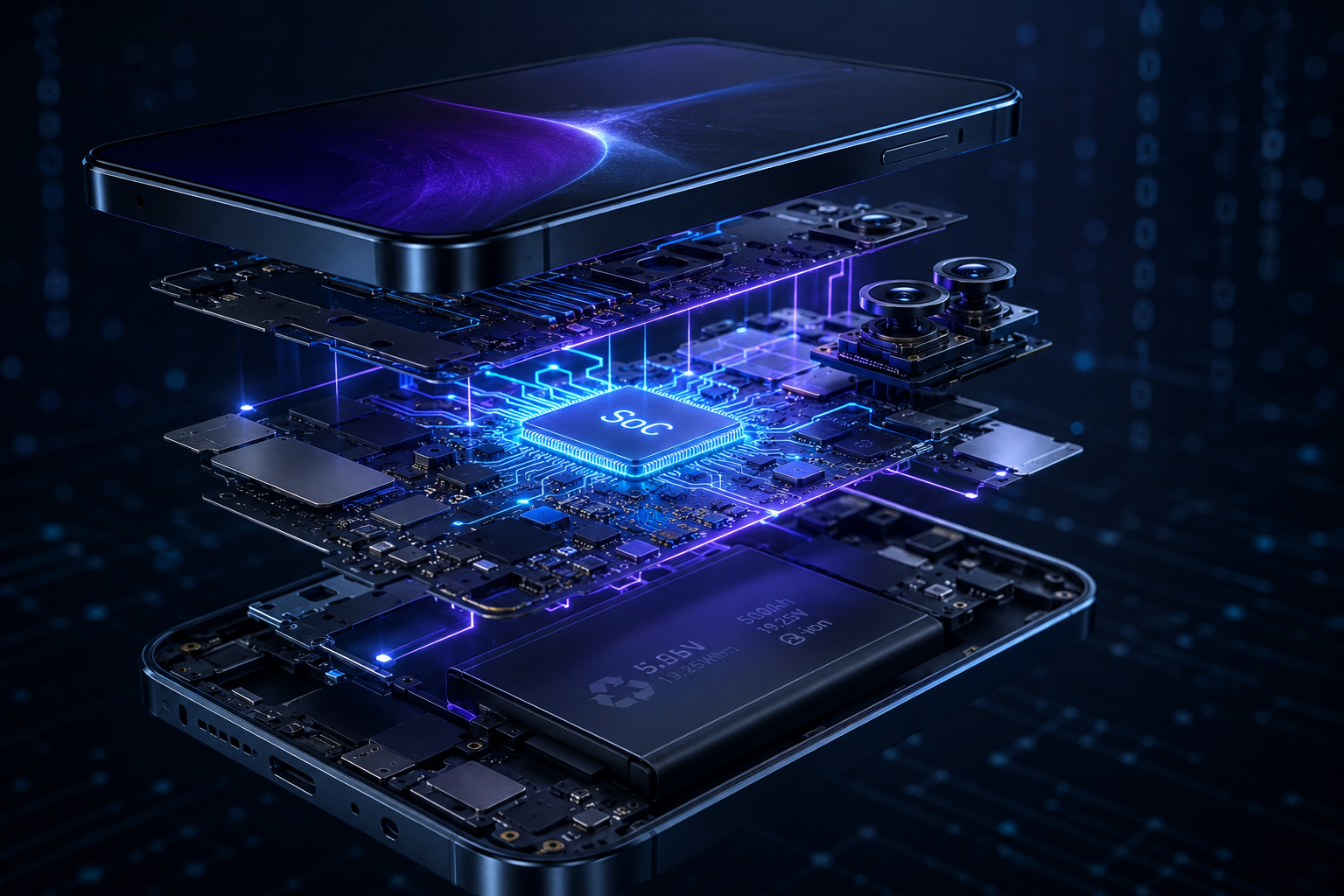
Inside every sleek smartphone exterior lies a densely packed array of components, each playing a critical role in its overall operation. Understanding these components is key to grasping the basics of smartphone operation.
The Central Nervous System: System on a Chip (SoC)
The “brain” of your smartphone is not just a single processor but a highly integrated System on a Chip, or SoC. This single chip houses multiple vital processing units, making it the most complex component in the entire device. Leading manufacturers like Qualcomm, Apple, and MediaTek design these chipsets, and their performance directly impacts your phone’s speed and responsiveness.
- Central Processing Unit (CPU): The CPU is the primary processing unit, responsible for executing general instructions, managing core operations, and running the user interface and applications. Modern smartphone CPUs feature multiple cores (e.g., dual, quad, hexa, octa-core), allowing them to handle several tasks simultaneously for improved multitasking and efficiency. These cores are often specialized, with some designed for high performance and others for power efficiency.
- Graphics Processing Unit (GPU): Dedicated to rendering graphics, the GPU handles tasks such as gaming, video playback, and complex animations, ensuring smooth visual experiences.
- Neural Processing Unit (NPU): An NPU is a specialized component that accelerates artificial intelligence (AI) and machine learning (ML) tasks, powering features like facial recognition, advanced camera processing, and voice assistants.
- Image Signal Processor (ISP): The ISP is crucial for camera functionality, processing raw image data from the camera sensors into high-quality photos and videos.
- Modem: This component is responsible for all wireless communication, enabling your smartphone to connect to cellular networks (4G, 5G), Wi-Fi, and Bluetooth.
Memory and Storage: The Device’s Workspace and Archive
Just like a computer, smartphones rely on memory and storage to function effectively.
- Random Access Memory (RAM): RAM is the temporary workspace where your smartphone stores data and instructions actively being used by the processor. More RAM allows your phone to run more applications simultaneously without slowing down.
- Internal Storage (ROM/Flash Memory): This is where your operating system, applications, photos, videos, and documents are permanently stored. While some smartphones allow storage expansion via microSD cards, many modern devices rely solely on their fixed internal storage.
The Visual Gateway: Display
The display is your primary interface, converting electrical signals into visual information and registering your touch inputs. Modern smartphones predominantly use capacitive touchscreens, which detect the electrical properties of your finger for intuitive control. Display technologies like LCD (Liquid Crystal Display) and OLED (Organic Light-Emitting Diode) offer varying levels of brightness, contrast, and color accuracy.
Powering the Experience: Battery
The battery provides the essential energy for all smartphone operations. Most modern smartphones utilize lithium-ion batteries, valued for their lightweight nature and high energy density. However, batteries have a finite lifespan and their performance degrades over time with usage.
Capturing Moments: Cameras
Smartphones are equipped with multiple cameras, typically one on the front for selfies and video calls, and one or more on the rear for high-quality photos and videos. Advanced camera systems often include specialized lenses (e.g., wide-angle, telephoto, macro) and depth sensors to enhance photographic capabilities.
Interacting with the World: Sensors
A suite of sensors allows your smartphone to understand its environment and your interactions, making it truly “smart”. Common sensors include:
- Accelerometer: Detects changes in the device’s orientation and motion.
- Gyroscope: Measures angular velocity and rotation, crucial for gaming and virtual reality.
- Proximity Sensor: Turns off the screen during calls to prevent accidental touches and save battery.
- Ambient Light Sensor: Adjusts screen brightness based on surrounding light conditions.
- GPS (Global Positioning System): Provides location services for navigation and location-based apps.
- Magnetometer (Digital Compass): Detects magnetic fields to determine direction.
Connecting You: Communication Modules
Beyond the modem integrated into the SoC, dedicated modules handle various forms of connectivity:
- Wi-Fi: Connects to local wireless networks for internet access, generally faster and more economical for large data transfers than cellular data.
- Bluetooth: Enables short-range wireless communication with accessories like headphones, smartwatches, and car systems.
- NFC (Near Field Communication): Facilitates short-range wireless data transfer for tasks like mobile payments and quick pairing with other devices.
Auditory Experience: Speakers and Microphones
Speakers allow for audio output, while microphones capture your voice for calls, voice commands, and audio recording. High-quality audio components enhance both communication and multimedia consumption.
The Brains Behind the Operation: Smartphone Operating System Explained
The operating system (OS) is the software foundation that manages all the smartphone’s hardware and software components, orchestrates application execution, handles user input, and maintains device security. The two dominant smartphone operating systems are Android and iOS, each offering a unique ecosystem and user experience.
Android vs. iOS: A Tale of Two Ecosystems
Android, developed by Google, is an open-source operating system based on the Linux kernel. Its open nature allows for extensive customization by various device manufacturers, leading to a wide range of Android devices from different brands. The Android architecture features a layered system framework, managing hardware, applications, and background processes. The Linux Kernel acts as the core, managing system resources and providing communication between hardware and software through drivers.
iOS, developed by Apple, is a proprietary operating system specifically designed for Apple’s iPhone devices. It’s known for its tight integration with Apple hardware, strong security features, and a streamlined user experience. While the underlying architecture differs, both operating systems employ sophisticated mechanisms to manage memory, power, and security, ensuring applications run in isolated environments for stability and protection.
The OS continuously manages resources, allocates processing power, and handles tasks like:
- Hardware Management: Controlling all the phone’s internal components and external peripherals.
- Application Management: Providing the environment for third-party applications to run and ensuring smooth multitasking.
- User Interface (UI) Management: Processing touches, swipes, and button presses to translate user actions into commands.
- Security Management: Enforcing app permissions and data access controls to protect user information.
- Power Management: Optimizing battery consumption through various power states and background restrictions.
From Tap to Triumph: How Mobile Phones Operate Step-by-Step
Let’s demystify the journey of a common smartphone action. This step-by-step breakdown illustrates how mobile phones operate.
1. Powering On Your Device
When you press the power button, a tiny electrical signal activates the power management system. This system checks the battery level and, if sufficient, sends a surge of power to the SoC. The processor then accesses a special memory called the bootloader, which contains a checklist for startup. This involves quick checks of components like the screen, memory, and communication radios (a power-on self-test). Once these checks pass, the bootloader initiates the loading of the operating system from storage into RAM. The OS then finalizes services like the touchscreen and cellular connection, presenting you with the familiar home screen.
2. Making a Call: The Journey of Your Voice
- Voice to Digital: When you speak into your phone, the microphone converts your voice into an electrical signal. This analog signal is then converted into digital data.
- Signal Transmission: The phone’s modem encodes this digital data onto radio waves, which are then transmitted by the phone’s antenna to the nearest cell tower (base station).
- Network Routing: The cell tower receives the signal and forwards it through the cellular network’s core to the recipient’s nearest cell tower. As you move, the network seamlessly “hands off” your call from one cell tower to another to maintain connectivity.
- Digital to Voice: The recipient’s cell tower relays the signal to their phone, which decodes the digital data back into an electrical signal and then into audible sound through their speaker.
3. Opening an Application: A Symphony of Processing
When you tap an app icon:
- User Input: The touchscreen detects your finger’s electrical properties and sends this input to the operating system.
- OS Command: The OS recognizes the tap as a request to launch the specific application.
- Memory Retrieval: If the app is not already in RAM, the OS instructs the processor to load the app’s code and data from the internal storage into RAM.
- Processor Execution: The CPU, in conjunction with the GPU for graphical elements and potentially the NPU for AI features, executes the app’s instructions.
- Display Output: The results of these computations are rendered by the GPU and sent to the display, showing the app’s interface and content.
Powering Performance: Understanding Smartphone Processing Power
The overall speed and responsiveness of your smartphone are largely determined by its processing power, which primarily resides within the System on a Chip (SoC). Key factors influencing performance include:
- Clock Speed: Measured in gigahertz (GHz), the clock speed indicates how many cycles each processor core can execute per second. A higher clock speed generally translates to faster task execution.
- Number and Type of Cores: As discussed, more cores allow for parallel processing of tasks. Modern SoCs often employ a “big.LITTLE” or similar architecture, combining powerful performance cores for demanding applications with energy-efficient cores for lighter tasks, balancing speed and battery life. For instance, a processor might have two high-performance ARM Cortex-X1 cores, two mid-range ARM Cortex A78 cores, and four energy-efficient ARM Cortex A55 cores.
- Fabrication Process: Measured in nanometers (nm), this refers to the size of the transistors on the chip. A smaller nanometer number (e.g., 3nm, 4nm) indicates a more advanced, efficient, and typically faster chip that consumes less power.
- Cache Memory: A small but very fast memory area within the processor that stores frequently accessed instructions, reducing the time the CPU needs to fetch data from slower main RAM.
Ultimately, a powerful SoC enables smoother multitasking, faster app loading, more fluid gaming, and efficient handling of complex tasks like video editing or AI computations. Brands like Qualcomm’s Snapdragon series and Apple’s A-series chips are well-known for their robust processing capabilities.
Beyond the Basics: Advanced Smartphone Technology Explained
Smartphone technology is in a constant state of evolution, pushing the boundaries of what these devices can achieve. Here are a few advanced innovations:
- 5G Connectivity: The latest generation of cellular technology, 5G, offers significantly faster data speeds, lower latency, and greater capacity compared to its predecessors (4G/LTE), enabling new possibilities like enhanced augmented reality, real-time cloud gaming, and more reliable connected devices.
- Biometric Security: Features like fingerprint sensors and facial recognition systems provide secure and convenient ways to unlock your device and authenticate payments, leveraging specialized hardware and software for robust protection.
- Artificial Intelligence (AI) and Machine Learning (ML): Beyond the NPU, AI is deeply integrated into many smartphone functions, from optimizing battery life and camera settings to personalizing user experiences and enhancing voice assistant capabilities.
- Foldable Displays: Innovative screen technologies allow smartphones to fold, offering larger display real estate in a compact form factor, though this technology is still evolving.
- Wireless Charging: Utilizing electromagnetic induction, wireless charging allows devices to be charged by simply placing them on a compatible charging pad, eliminating the need for physical cables.
Choosing Your Device: Key Considerations and Common Pitfalls
Selecting a smartphone involves balancing various factors to meet your needs and budget. Understanding these trade-offs can prevent common mistakes.
Comparing Specs: What Really Matters
When evaluating smartphones, avoid getting caught up in raw numbers without considering the overall ecosystem. While specifications like RAM and CPU cores are important, how well the hardware and software are optimized together is often more crucial. For example, some operating systems might run smoother on less powerful hardware due to efficient optimization.
- Processor: Consider the type and generation of the SoC. A newer generation flagship processor (e.g., Qualcomm Snapdragon 8 Gen series, Apple A-series) typically offers significant performance gains over older or mid-range chips.
- RAM: For smooth multitasking in 2026, 6GB to 8GB of RAM is a solid baseline for most users, with 12GB or more benefiting heavy users and mobile gamers.
- Storage: Account for your app and media habits. 128GB is a minimum for many, but 256GB or 512GB provides more breathing room, especially if your device doesn’t support expandable storage.
- Battery Life: Look beyond raw mAh numbers. Software optimization plays a huge role. Read reviews that focus on real-world battery endurance.
- Camera: Don’t just chase megapixels. Sensor size, lens quality, and image processing (ISP and NPU capabilities) are equally, if not more, important for photo and video quality.
Common Mistakes to Avoid When Using Your Smartphone
Many users unknowingly engage in habits that can degrade their smartphone’s performance, battery life, or security:
- Force-Closing Apps: Regularly force-closing apps by swiping them away from recent tasks can actually drain battery faster. Both iOS and Android are designed to efficiently manage background apps, often putting them to sleep, and fully restarting an app consumes more power than waking it from a dormant state.
- Ignoring Software Updates: Skipping operating system and app updates can leave your device vulnerable to security flaws and miss out on performance improvements and new features.
- Overcharging or Constantly Draining the Battery: Keeping your phone perpetually at 100% charge or allowing it to consistently drain to 0% can negatively impact lithium-ion battery longevity. Aim to keep your charge between 20% and 80% for optimal battery health. Charging in direct sunlight or extreme temperatures can also damage the battery and screen.
- Not Backing Up Data: Failing to regularly back up photos, contacts, and other important data is a significant risk. Cloud services or external storage can prevent permanent data loss in case of device failure or theft.
- Using Weak Passwords/Insecure Biometrics: Simple passcodes like “123456” are easily compromised. Utilize strong, unique passwords and combine them with robust biometric security where available, although a complex PIN or password should always be a fallback.
- Cluttering with Unnecessary Apps and Widgets: Too many unused apps or active widgets can consume system resources, slowing down your phone and draining the battery.
- Neglecting Charging Port Maintenance: Lint and debris can accumulate in charging ports, leading to connection issues. A gentle cleaning can often resolve charging problems before they become severe.
Expert Insights for Optimizing Your Smartphone Experience
As a seasoned tech enthusiast, I’ve learned that maximizing your smartphone’s potential goes beyond just buying the latest model. It involves smart usage and proactive maintenance.
- Prioritize Software Updates: My top recommendation is always to install software updates promptly. Manufacturers don’t just add new features; they often include critical security patches and performance optimizations that keep your device running smoothly and securely. Think of it as essential preventative care for your digital tool.
- Mind Your Background Apps: While force-closing isn’t ideal, judiciously managing background app refresh settings can make a tangible difference, especially for battery life. Review which apps genuinely need to run in the background and disable those that don’t, particularly for social media or news feeds you check manually.
- Optimize Storage Proactively: A full storage drive is a slow storage drive. Regularly offload photos and videos to cloud storage or a computer. Clear app caches periodically; these temporary files can accumulate significantly over time and impact performance. Many phones have built-in storage management tools that can help identify and clear unnecessary files.
- Embrace Digital Wellness Features: Modern operating systems include powerful tools like “Digital Wellbeing” (Android) or “Screen Time” (iOS). Use these to set app limits, schedule “Do Not Disturb” modes, and analyze your usage patterns. This isn’t just about productivity; it’s about reclaiming your time and focus.
- Understand Your Processor’s Strengths: Not all processors are created equal. If you’re a heavy mobile gamer, investing in a phone with a top-tier SoC and a powerful GPU is crucial. For everyday communication and browsing, a mid-range processor from the last two years will likely suffice, offering excellent value without overspending. Recognize your usage patterns and align your device’s capabilities accordingly.
- Restart Regularly: It sounds simple, but a weekly restart can clear out temporary glitches and refresh your system, often leading to a noticeably snappier experience. It’s the digital equivalent of a good night’s sleep for your device.
- Protect Your Physical Device: While not strictly about “how it works,” physical protection is paramount. A quality case and screen protector prevent damage that can render even the most advanced internal components useless. Also, be mindful of environmental factors like extreme heat or cold, which can harm internal components and battery health.
By implementing these strategies, you’ll not only prolong the life of your device but also unlock a more efficient and enjoyable smartphone experience, truly understanding how your smartphone operates at a deeper level.
Frequently Asked Questions About How Smartphones Work
- How do smartphones connect to the internet?
- Smartphones connect to the internet primarily through two methods: cellular data (using mobile networks like 4G LTE or 5G via cell towers) and Wi-Fi (connecting to local wireless networks via routers). The phone’s modem handles the cellular connection, while a dedicated Wi-Fi chip manages the Wi-Fi connection.
- What is a System on a Chip (SoC) and why is it important?
- A System on a Chip (SoC) is a single integrated circuit that contains most or all components of a computer or other electronic system. In a smartphone, it integrates the CPU, GPU, modem, and other crucial processors onto one chip, acting as the device’s brain. Its importance lies in its ability to save space, reduce power consumption, and enable highly integrated, powerful performance within a compact form factor.
- How does the operating system manage hardware and software?
- The operating system (OS), such as Android or iOS, acts as an intermediary between the hardware and software. It manages hardware resources (like the processor, memory, and sensors) through drivers, allocates resources to applications, handles user input from the touchscreen, and enforces security protocols. It essentially provides the framework that allows apps to run and users to interact with the device.
- Does constantly closing apps save battery life?
- Contrary to popular belief, constantly force-closing apps in the background does not typically save battery life and can sometimes even consume more power. Modern smartphone operating systems are designed to efficiently manage apps, suspending them in a low-power state when not in active use. Fully restarting an app consumes more resources than simply resuming a suspended one.